Powered by Blogger.
Showing posts with label Motherboard. Show all posts

Wednesday, 17 August 2011

GIGABYTE Z68X-UD7-B3 Intel Z68 Motherboard Review

Legit Motherboard Reviews

The GIGABYTE Z68X-UD7-B3 - The New Flagship

GIGABYTE Z68-UD7-B3 Motherboard Layout

GIGABYTE has been building computer components for going on twenty five years now. Consistently improving, redesigning and bringing new features to the market, GIGABYTE is on the leading edge of the market. Over the past couple of years, I have used several GIGABYTE motherboards in some of my personal systems, and reviewed even more GIGABYTE products. Throughout my personal experience with GIGABYTE products, I have always been happy with the GIGABYTE products. Hopefully when all is said and done, today will be no different!

Today we have the top of the line Intel Z68 express chipset motherboard from GIGABYTE, the GIGABYTE Z68X-UD7-B3! Being the flagship socket 1155 motherboard from GIGABYTE, the Z68X-UD7-B3 isn't priced for faint of heart. It  is priced for those of us that will pay for the quality and want all the features that the GIGABYTE Z68X-UD7-B3 had to offer! Right now you can pick up the GIGABYTE Z68X-UD7-B3 for as little as $337.91 Plus shipping.

There are two main features that were essentially added to the Intel P67 Chipset to make up the new Z68 chipset. The first is Intel Smart Response Technology, a quote about Intel Smart Response Technology from Joe's article:

Using the latest version of Rapid Storage Technology drivers (10.5) and adjusting some easy settings in the Intel Control Center you essentially create a RAID configuration which treats the SSD as a cache for the most frequently used data. Access then comes via the faster SSD rather than the slower HDD, increasing performance markedly. Right now, some are thinking, wait, this isn't new...we've seen a version of this before! The voices in your head are correct. A while back we had a look at the Seagate Momentus XT Hybrid drive which essentially employs the same concept, albeit all bundled on a single drive.

Intel HD Graphics

The second feature that was employed was the ability to use the Intel HD Graphics on the second generation Intel Core iX series processors. While the graphic aren't that spectacular for gaming purposes, they do have a number of capabilities that can be quite handy. One of which is Intel Quick Sync Video, also commonly referred to as Intel QSV. Intel QSV completes the video processing on the hardware instead of on the software.

For some reason, GIGABYTE chose not to implement the second half of the Intel Z68 chipset features on the GIGABYTE Z68X-UD7-B3. Gigabyte hinted that enthusiasts wouldn't be wanting that feature on a high-end board like the Z68X-UD7, but since consumers are paying an extra $55 for this board over the P67A-UD7 we think that choice should be up to them.

GIGABYTE P67A-UD7-B3 24 Phase Power Design

The GIGABYTE Z68X-UD7-B3 has 24 Phases of power being delivered to the CPU help to build a much more reliable power delivery system. The entire GIGABYTE 6 series of motherboards uses DUAL CPU Power Technology. This technology allows the CPU VRM power phases to split into a pair of power engines that work together. In the case of the Z68X-UD7-B3 12 phases will be inactive while the other 12 are supplying power.

GIGABYTE Dual CPU Power Technology

If you are using your shiny new GIGABYTE Z68X-UD7-B3 for some light work like web browsing or any other task that isn't very CPU intensive, the Dual CPU Power Technology will drop the number of phases that are active. Fire up an application like Folding at Home that will really use the CPU power that you have and the GIGABYTE Z68X-UD7-B3 will increase the number of active phases up to the maximum 24 for the ultimate power delivery system.

Intersil PWM controller VRD12

Speaking of power phases, all of the GIGABYTE 6 series motherboards use an Intersil PWM controller. The Intersil PWM controller has been approved by Intel and is VRD 12 compliant. The Intel approved PWM controller offers SerialVID (SVID); this transfers power management information from the processor to the voltage regulator controller. This allows a more efficient signaling control between the CPU and PWM controller. What does this mean for the end user? Ideally, a more energy efficient system.

GIGABYTE P67A-UD7-B3 Driver Mosfets

Traditional power delivery consists of a pair pf discrete PowerMOS and a driver IC. GIGABYTE has incorporated these components into a single chip. Doing this gives us several advantages. One of these advantages is size. The area required to mount the Driver MOSFET's is reduced by 50%. This will leave real estate available on the PCB for other integrated devices. Driver MOSFET's can achieve increased efficiency and higher power transfer at higher switching frequencies. This will help satisfy the growing power needs of the current processors.

One aspect of the Intel Z68 chipset that is an issue for some is the limited number of PCI express lanes. Being limited to a total of 16 lanes some companies have thrown in a third party chip to add some lanes. ASUS used the PLX PEX8608 chip to add a few extra lanes on the ASUS P8P67 Deluxe to bring the total number of PCIe lanes to 24. 20 of which are usable by the PCIe graphics. GIGABYTE went a different route, they added the NVIDIA NF200 chip to give a total of 32 PCIe lanes to the P67A-UD7-B3. This allows the Z68X-UD7-B3 to operate a pair of cards at x16 each or four cards at x8 each.

GIGABYTE Z68X-UD7-B3 Z68 Chipset Motherboard Specifications


CPU  - Support for:
  • Intel Core i7 processors

  • Intel Core i5 processors

  • Intel Core i3 processors

  • Intel Pentium processors

  • Intel Celeron processors in the LGA1155 package

Chipset  - Intel Z68 Express Chipset
Memory
  • 4 x 1.5V DDR3 DIMM sockets supporting up to 32 GB of system memory

  • Dual channel memory architecture

  • Support for DDR3 2133/1866/1600/1333/1066 MHz memory modules

  • Support for non-ECC memory modules

  • Support for Extreme Memory Profile (XMP) memory modules

Audio
  • Realtek ALC889 codec

  • High Definition Audio

  • 2/4/5.1/7.1-channel

  • Support for Dolby Home Theater

  • Support for S/PDIF Out

LAN
  • 2 x Realtek RTL8111E chips (10/100/1000 Mbit)

  • Support for Teaming

  • Support for Smart Dual LAN

Expansion Slots
  • 2 x PCI Express x16 slots, running at x16 (PCIEX16_1, PCIEX16_2)

  • 2 x PCI Express x16 slots, running at x8 (PCIEX8_1, PCIEX8_2)1

  • 1 x PCI Express x1 slot
    (All PCI Express slots conform to PCI Express 2.0 standard.)

  • 2 x PCI slots

Multi-Graphics Technology  - Support for 2-Way/3-Way ATI CrossFireX/NVIDIA SLI technology
Storage Interface  - Chipset:
  • 2 x SATA 6Gb/s connectors (SATA3_0, SATA3_1) supporting up to 2 SATA 6Gb/s devices

  • 4 x SATA 3Gb/s connectors (SATA2_2~SATA2_5) supporting up to 4 SATA 3Gb/s devices 

  • Support for SATA RAID 0, RAID 1, RAID 5, and RAID 10

 - 2 x Marvell 88SE9128 chips:
  • 2 x SATA 6Gb/s connectors (GSATA3_6, GSATA3_7) supporting up to 2 SATA 6Gb/s devices 

  • 2 x eSATA 6Gb/s connectors (eSATA/USB Combo) on the back panel supporting up to 2 SATA 6Gb/s devices

  • Support for SATA RAID 0 and RAID 1

USB  - Chipset:
  • Up to 8 USB 2.0/1.1 ports (4 on the back panel, including 2 eSATA/USB Combo, 4 via the USB brackets connected to the internal USB headers)

 - 2 x Renesas D720200 chips and 2 x VLI VL810 hubs:
  • Up to 10 USB 3.0/2.0 ports (6 on the back panel, 4 via the USB brackets connected to the internal USB headers)

IEEE 1394  - T.I. TSB43AB23 chip:
  • Up to 3 IEEE 1394a ports (2 on the back panel, 1 via the IEEE 1394a bracket connected to the internal IEEE 1394a header)

Internal I/O Connectors
  • 1 x 24-pin ATX main power connector

  • 1 x 8-pin ATX 12V power connector

  • 4 x SATA 6Gb/s connectors

  • 4 x SATA 3Gb/s connectors

  • 1 x CPU fan header

  • 3 x system fan headers

  • 1 x power fan header

  • 1 x Chipset fan header

  • 1 x front panel header

  • 1 x front panel audio header

  • 1 x S/PDIF Out header

  • 2 x USB 2.0/1.1 headers

  • 2 x USB 3.0/2.0 headers

  • 1 x IEEE 1394a header

  • 1 x clearing CMOS button

  • 1 x power button

  • 1 x reset button

Back Panel Connectors
  • 1 x PS/2 keyboard/mouse port

  • 1 x optical S/PDIF Out connector

  • 1 x coaxial S/PDIF Out connector

  • 2 x IEEE 1394a ports

  • 2 x USB 2.0/1.1 ports

  • 6 x USB 3.0/2.0 ports

  • 2 x eSATA/USB Combo connectors

  • 2 x RJ-45 ports

  • 6 x audio jacks (Center/Subwoofer Speaker Out/Rear Speaker Out/Side Speaker Out/Line In/Line Out/Microphone)

I/O Controller  - iTE IT8728 chip
H/W Monitoring
  • System voltage detection

  • CPU/System temperature detection

  • CPU/System/Power fan speed detection

  • CPU overheating warning

  • CPU/System/Power fan fail warning

  • CPU/System fan speed control

BIOS
  • 2 x 32 Mbit flash

  • Use of licensed AWARD BIOS

  • Support for DualBIOS

  • PnP 1.0a, DMI 2.0, SM BIOS 2.4, ACPI 1.0b

Unique Features
  • Support for @BIOS

  • Support for Q-Flash

  • Support for Xpress BIOS Rescue

  • Support for Download Center

  • Support for Xpress Install

  • Support for Xpress Recovery2

  • Support for EasyTune

  • Support for Dynamic Energy Saver 2

  • Support for Smart 6

  • Support for Auto Green

  • Support for eXtreme Hard Drive (X.H.D)

  • Support for ON/OFF Charge

  • Support for Cloud OC

  • Support for Q-Share

Form Factor ATX Form Factor; 30.5cm x 24.4cm

GIGABYTE Z68X-UD7-B3 compared to the P67A-UD7-B3

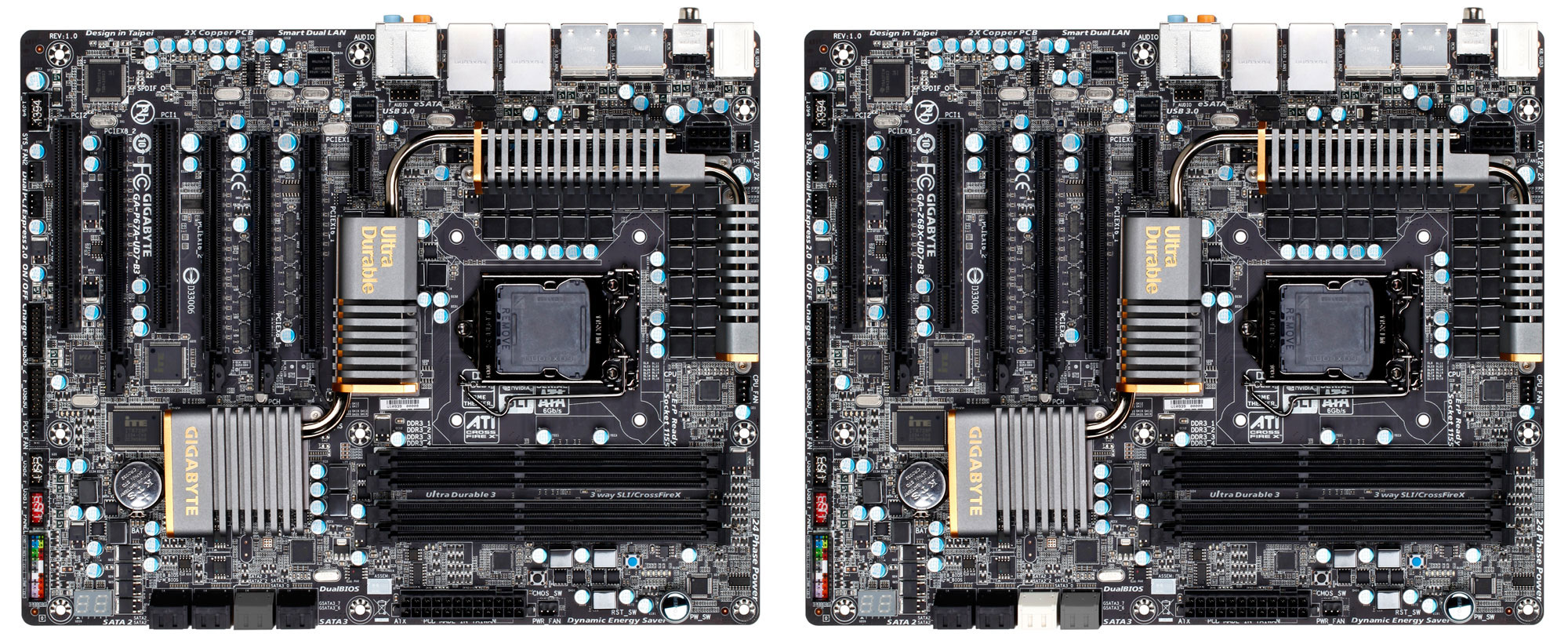
The GIGABYTE Z68X-UD7-B3 is identical to the GIGABYTE P67A-UD7-B3 that we took a look at a little over a month ago. In the above photo you can see that the boards are virtually identical. The only visual differences I was able to find was the color of the SATA III 6Gbps ports. If you are interested in the bundle, layout, or system BIOS of the GIGABYTE Z68X-UD7-B3 please reference the appropriate pages of our GIGABYTE P67A-UD7-B3 review as they are identical. For now let's jump to the test system page and take a look at what we will be using for our system today!

Next Page - The Legit Reviews Test System


Read more...

ASUS F1A75-M Pro AMD APU Motherboard Review

Read more...

Thursday, 14 July 2011

IGP performance world record smashed on overclocked GIGABYTE Llano motherboard

20019_11_gigabyte_a75m_ud2h_with_upcoming_amd_apu_breaks_igp_world_record

TweakTown.com have published an article and video where they have our forthcoming A75M-UD2H motherboard pushing AMD’s latest Llano APU to achieve an incredible P6281 points in 3DMark Vantage (performance mode). TweakTown is claiming this overclock as a world record for an integrated graphics processor, further ramping up the buzz of expectation regarding AMD’s eagerly anticipated Llano APU platform launch later this week. We’ve put a lot of work into making our new Llano-compatible AMD A series boards the ideal base for these new Accelerated Processor Units, or APUs, so of course we’re totally chuffed to see a record-breaking overclock on one of our boards at this early stage.

 “You may have seen this type of configuration before, but not like how you are going to see in the video above. We managed to overclock the AMD CPU from its default clock speed of 2.9GHz all the way up to 3.6GHz (150 x 24) using an FSB of 150MHz. In turn this also overclocked the DX11 Radeon HD GPU within the AMD APU from a core clock speed of 600MHz to 900MHz. This is really impressive and we even saw Crysis 2 running at 720p at around 40 - 45 frames per second and from a system without a video card (strange to look at, actually), that is rather good.” – TweakTown

<\/param><\/embed><\/object><\/div>";" alt="">

Read the full article on TweakTown here.

You can read this blog in Chinese (中文版) here.

Read more...

Bitfenix USB 3.0 connectors pass GIGABYTE motherboard compatibility testing

Modern motherboards can have up to 2 onboard USB 3.0 headers, but not every mobo ships with front USB 3.0 connector cables. What do you do if your case doesn’t support enough front panel USB 3.0 connectors?

image

I’m facing this problem at the moment with my newest PC build where my new case only has 1 onboard header for USB 3.0 (for 2 front USB 3.0 ports). This means that the other 2 front USB 3.0 ports are wasted! What’s more is that my PC sits snugly under my desk in my cubicle at work, so it is not practical for me to always get on my hands and knees to access the USB 3.0 ports in the back I/O panel, so I want to have the maximum number of convenient front panel USB ports.

Bitfenix just sent us two solutions to this problem in the form of the BFA-U3-KU3IU3-RP Internal USB 3.0 Adapter and the BFA-U3-K435-RP USB 3.0 Front Panel. They both just passed GIGABYTE motherboard compatibility testing and we have added them to our USB 3.0 microsite. Here they are (they are hyperlinked so just click on them to have a look at the Bitfenix product web page):

image  image

I especially like the front panel connector because it has 4 USB 3.0 ports with a decent distance between them so that you can use multiple bulky USB devices at the same time.

Check out our USB 3.0 microsite for more USB 3.0 devices that have passed GIGABYTE motherboard compatibility testing.

A Chinese version of this blog article can be found here.

Read more...

Gigabyte 990FXA-UD7 Motherboard has Hardware Heaven on cloud 9

gigabyte-990fxa-ud7_slots

Our high-end AMD 900 series motherboard offering has certainly impressed Stuart Davidson at HardwareHeaven.com. The 990FXA-UD7 was given a thorough and detailed examination last week, winning an impressive 49 out of 50 points plus the Hardware Heaven Gold award. Here’s a taste of what Stu had to say:

Performance wise the 990FXA-UD7 is again very impressive. It outperforms the fastest board we have seen so far from ASUS and features all of the latest technology such as USB 3.0 and SATA 6GB/s to utilise the potential of our components. Users may also find support for 3TB drives, enhanced USB charging and Bluetooth auto shutdown to be valuable features.

Of course these high specifications and features do come at a cost which makes this board more expensive than most 990FX alternatives. That said, at £189/$249 the 990FXA-UD7 is still considerably cheaper than alternative boards for the Intel X58 platform.

score

Summary
An excellent motherboard which has great performance and some excellent features. Added to that it is the fastest AMD 990FX board we have tested so far.

gold

The 990FXA-UD7 is in fact the most highly specced AMD motherboard that GIGABYTE has ever done, in fact the first in our UD7 class. Let’s not forget too that excitement levels should notch up a level in a month or so’s time when AMD highly anticipated AMD FX Bulldozer CPUs come to market. We can barely contain our excitement.

Full HardwareHeaven review here.

Read this blog in Chinese here.

Read more...

Bit-tech take a tour of our motherboard factory

Earlier this month I was fortunate enough to join Paul Goodhead from bit-tech.com on a tour of our GIGABYTE motherboard factory out in Taipei County, and what an eye opening experience it was. Motherboards have come a long way in the last few decades, adding more and more features with improvements to durability and longevity, so much so that motherboard manufacturing now involves bleeding-edge technology and manufacturing processes. Nowhere is this more true than at our Nan-Ping factory just outside Taipei in Northern Taiwan where GIGABYTE’s top tier motherboards products are manufactured, thoroughly tested and then packaged ready to be shipped off to DIY PC retailers around the globe.

Paul’s written a great article which details every step of the process with lots of photos of the production line itself. If you’ve ever wondered just how a motherboard is created, check out the article for yourself. Here are some images to whet your appetite:gigabyte-s-28gigabyte-s-14

Did you know?

GIGABYTE is the only DIY PC motherboard manufacturer that still has a manufactures in Taiwan. This gives us the edge in a number of areas. For example it means that top-tier motherboards products that showcase new technologies and bleeding edge features can be thoroughly honed, tuned and debugged by a relatively small, yet highly capable team of experts that have been together for many years. Believe me when I say that is virtually impossible to replicate in China and is one of our core strengths as a company. Also, when labor shortages hit production lines in Mainland China, our Taiwan factory can help absorb up to 40% production. While on the factory tour I was also reminded that we make every effort to make sure that all boards are tested to the limit, using the most stringent quality control procedures that actually help reduce our RMA rates.

Check out Paul’s full article on bit-tech.com.

Chinese version of this article can be found here.

Read more...

Thursday, 9 June 2011

Computex 2011: Danshui Bay Concept Motherboard

ASUS have been coming to Computex to sensationalize and dazzle the press with concepts for years, and this year is no different, regardless of whether something is technically feasible or not.  Last year, we saw the ASUS Immensity motherboard concept that was never put into production – an X58 featuring a 5450-type integrated GPU and a Lucid Hydra chip to combine any discrete GPU combination on board.  This year takes a turn for the surreal.

Introducing the Danshui Bay concept:

Simply put, ASUS are wanting to combine two chipsets on one motherboard – the X58 socket 1366, and the X79 socket 2011.  If we completely disregard the technical challenges this faces, it provides the interesting idea of something that might be possible in the future:  You want to upgrade your machine to the latest chipset and processor.  Rather than throw your old processor away or sell it on, you could buy a motherboard that lets you harness the power of the old processor and a new processor together, in some form of chimerism.

As for the technical challenges in producing such a product, I could reel off a whole list.  For a start, chipsets are not designed to talk to each other.  Processors need dual QPI links to talk to each other of the same model – how that would work with different socket processors with different caches and core counts is also a mystery, as with 1366 you would need an appropriate Xeon.  With two chipsets, you’ll have to have a different set of memory for each processor, and possibly getting a mismatch there based on dual/tri/quad channel memory.  Each processor requires its power and a set of PCIe each – unless you disregard the PCIe of one of the chipsets but then you would have to have at least the processor of the other socket in order to run a discrete GPU.  The same goes with SATA ports, I/O connectors, USB headers, and so on.

Obviously, this board presented is a mockup – merely bits and pieces put together.  It’s showing sixteen SATA 3 Gbps and six SATA 6 Gbps for a start, as well as no significant power delivery and an obscene form factor.  ASUS only want to know that if there was a demand for such a product, despite the technical limitations.

{gallery 1160}

]]>

Read more...

Monday, 23 May 2011

ASUS M4A77TD Pro AM3 Motherboard Mini-Review


Update: This board has full 6-core CPU support for both the 1055T and 1090T Black Edition Hex-Core 45nm CPU's. BIOS version/update 2005.

I have never really been dedicated to one single motherboard brand like I am with my CPU's and video cards. I have had pretty good results from Gigabyte, MSI, ASUS, and ASRock. Though my last 3 personal builds have all been ASUS powered. So I guess ASUS has managed to sneak it's way to the top of my favorites list. My latest build is no exception.

I did quite a bit of research on what motherboard to use in my new build, I wanted one that did not cost a lot, yet had all the basic features I was looking for.

  • AMD Northbridge since I use ATI video cards
  • Successful core unlocking of AMD X2 and X3 CPU's results from other users
  • Good overclocking and BIOS options
  • DDR3 Support
  • AM3
  • 140 Watt CPU support
  • Crossfire ready
  • Good on-board audio
  • Gigabit LAN
  • Future hex-core CPU support
With those basic wants in mind I did a lot of digging and ended up settling on the ASUS M4A77TD Pro motherboard. I was able to pick it up on Newegg on an "Open Box" deal for $70, saving me money I was able to use on other hardware.

This motherboard not only meet all my needs, but had a 100% success rate on core unlocks and good overall overclocking results. The AMD770 Chipset also allows me to use AMD Overdrive to its fullest potential.

Here is a list of its overclocking features:
  • Intelligent overclocking tools
  • Turbo Key
  • Stepless Frequency Selection
  • FSB tuning from 200MHz up to 550MHz at 1MHz increment
  • PCI Express frequency tuning from 100MHz up to 150MHz at 1MHz increment
  • Overclocking Protection
  • ASUS CPU Parameter Recall
My only concern was it was the first time I had ever ordered a product "open box". Though I did not require any of the normal hardware that comes with a new motherboard, I have more than enough on hand and drivers can all be found online, I was concerned with the board condition. In the end however, my concerns were unwarranted, it showed up in a M4A77TD box (Not the pro version), well packed, and in mint condition.

The board fit perfectly in my mid-tower case. Installation of the CPU, memory, and into my case took a total of about 15 minutes. Once I got all the other hardware installed, hooked up, and all my cables managed to promote unimpeded airflow, the board fired right up and I begin installing my OS.

Now I had read in some online reviews, such as those on Newegg, that some other users were having problems with the boards related to the memory running at a single channel. When you would try to run in dual channel, the boards would not post. I however did not have a single problem with this. The ADATA 1600G OC DDR3 I purchased worked wonderfully and is perfectly stable running overclocked at 1600.

This board, for me, does everything I ask of it and more. There is also plenty of room to upgrade if the need ever arises. Though to be honest, I don't think that need will present itself anytime soon. As it is now, with the other hardware in the build, I can play any game on the market today that I would want to and it handles my multimedia, video, and graphic editing needs.

So after over a month of hard use, gaming, and stress testing overclocks, the ASUS M47A77TD Pro is still screaming right along and working flawlessly. So I give this board a 10 out of 10 and would recommend it to anyone looking for an affordable yet powerful AMD build.

Here is a breakdown of the boards primary specifications:
  • ATX Formfactor
  • AMD Socket AM3 140W CPU 45nm Support
  • AMD Cool 'n' Quiet™ 2.0 Technology
  • AMD 770/SB710 Chipset
  • 5200 MT/s Hyper-Transport™ 3.0 interface
  • 4 x DIMM DDR3 1800(O.C.)/1600(O.C.)/1333/1066 (16GB Max)
  • 2 x PCIe 2.0 x16 - 1 x PCIe x1 - 3 x PCI
  • Realtek 8112L PCIe Gb LAN
  • 1 xUltraDMA 133/100 - 5 x Serial ATA 3Gb/s Support RAID 0,1,10 - 1 x eSATA 3Gb/s ports
  • VT1708S High Definition Audio 8 -Channels
  • 12 USB 2.0 ports
A few other ASUS specific features:
  • ASUS EPU-4 Engine
  • ASUS Express Gate
  • ASUS Turbo Key
  • ASUS Q-Fan
  • ASUS CrashFree BIOS 3
  • ASUS EZ Flash 2
  • ASUS MyLogo 2
  • ASUS AI NET 2
Rated: 10/10

Read more...

Sunday, 22 May 2011

Review: Biostar TA790GXB3 T-Series Motherboard


Along with my own upgrades, I also upgraded my wife's system, beleive it or not she was still running an old Pentium 4/AGP 4x based system. Needless to say, horrible performance by today's standards, even for simple web use. She simply never wanted to upgrade, this year, I did not give her a choice.

Basically, I was looking for an inexpensive build that would still provide her system with more power than it would ever need. My basic requirements were it had to be AM3 with 125Watt CPU support, PCIe X16, full ATX form factor, SATA II, DDR3 1600 support with 4 DIMMS, and on-board audio and video as backup in-case stand alone cards fail.

I finally ended up settling on the Biostar TA790GXB3 T-Series Motherboard. Now I have never really been a fan of Biostar, not due to any quality concerns, just the fact I never used any of their boards in my own builds. However I decided it was time to give them a shot. They are a well established company that has been around for a long time and are pretty well known for their quality "budget" boards. So far, I am very satisfied with the performance of the TA790GXB3.

Simply put, I knew that Crossfire would never be needed, and that 125 Watt CPU support would be more than enough to meet the demands it would be put to. This board came with on-board Realtek ALC662 audio as well as on-board ATI Radeon HD 3300 DX10 video in case her stand-alone cards ever failed. This way she can still use her system while a replacement it ordered.

CPU used:

It also had full support for the processor I wanted to run in the system as well as core unlocking and overclocking ability. That processor being the AMD Phenom II X2 550 "Callisto" Black Edition. A CPU I was using for well over a year, unlocked to 4 cores and overclocked to 3.8Ghz, stable the entire time. So I wanted a board I knew I could do that on. For her needs however, I did not unlock the other 2 cores, I have left it running as an X2 and simply overclocked to 3.6GHz since there is no need to go any higher, it is just nice to know I can if the need should arise.

Video card used:

The most "demanding" game that she plays is the Sims 3. So when I purchased the XFX Radeon 6950 for my much higher end gaming needs, I gave her the HIS Radeon HD 4870 IceQ4+ Turbo 1Gb 256-bit GDDR5 card I was running. Needless to say, like the processor, a massive step up from the AGP ATI Radeon 9700 Pro 128MB she was running. The 4870 was top of the line for the 4000 series of cards, and is still more than capable of playing any games on the market today at 1080p and maximum settings with stable framerates. It simply lacks DX11 support as well as next generation architecture and tessellation advancements obviously. For the Sims 3 however, it's not even a challenge. For as long as it lasts, this card will more than meet her graphics needs without even breaking a sweat.

Memory used:

I used the same RAM on this board as I do on mine. A-Data DDR3 1600G Gaming Series. She is currently running 4GB. The memory overclocks to 1600 no problem and is prefectly stable on this board.

Operating system used:

She was running XP Pro 32. With this new build however, I upgraded her to 7 Ultimate 32. This is also why she is running 4GB and not 8GB. I did not want her to have to deal with some of the compatibility issues of 64-bit that seems to be common with some of the software she runs on a regular basis. It's running wonderfully.

Other specifications:
  • Supported Socket AM3 processors AMD Phenom II X4 / Phenom II X3 / Phenom II X2 / Athlon II processor
  • AMD 125W processor support
  • AMD 790GX Chipset with ATI Radeon HD 3300 Graphics
  • Dual-Channel DDR3 -1600(OC)/1333/1066/800
  • ATI Hybrid Graphics Support
  • Integrated DVI interface with HDCP Support 1080P HD Video Experience
  • AMD OverDrive Utility Support
  • AMD OverDrive™ with ACC feature (Advanced Clock Calibration) supported
Overall impressions:

For the price, the Biostar TA790GXB3 seems to be a fantastic board. As long as you do not plan on Crossfire or running an X6 processor, it should have no problems meeting your budget build needs. It's great for low-end to moderate gaming, and even perhaps some high end gaming as well running a single GPU and a nice fast quad core with DDR3 1600. For what it is being used for here, it's an incredible value, especially since I managed to pick it up open box on Newegg. Great board from Biostar!

Biostar Link: http://www.biostar.com.tw/app/en/mb/introduction.php?S_ID=428

Newegg Link: http://www.newegg.com/Product/Product.aspx?Item=N82E16813138163

For a quick look at the board and what I got in my "open box" package, check out this video. Again, was still fighting a nasty cold when I recorded this, so please forgive me is I sound a bit out of it.

I also meant to say "upgradable to the X4" in the video, not "X6". Like I said, nasty cold, not the best time to try and make a video. haha


Read more...

Saturday, 21 May 2011

ASUS P8Z68-V Pro Motherboard Review

Legit Motherboard Reviews

First Look at the ASUS P8Z68-V Pro Z68 Motherboard

ASUS P8Z68-V Pro Motherboard Performance Review

In the middle of last week, Intel launched the new chipset for the Socket LGA1155 platforms. Dubbed the Intel Z68 chipset, it brings some new features to the table, as well as merges a few from the Intel H67 and the Intel P67. In our first article on the Intel Z68 chipset Joe took an in-depth look at Intel's Smart Response Technology. In short, Intel's Smart Response Technology... Well, I'll let Joe, the resident SSD expert at Legit Reviews, explain that for me:

Using the latest version of Rapid Storage Technology drivers (10.5) and adjusting some easy settings in the Intel Control Center you essentially create a RAID configuration which treats the SSD as a cache for the most frequently used data. Access then comes via the faster SSD rather than the slower HDD, increasing performance markedly. Right now, some are thinking, wait, this isn't new...we've seen a version of this before! The voices in your head are correct. A while back we had a look at the Seagate Momentus XT Hybrid drive which essentially employs the same concept, albeit all bundled on a single drive.

Along with giving us an in-depth look at Intel's Smart Response Technology, we also got a peek at the ASUS P8Z68-V Pro motherboard! This particular board is going to be the primary focus of our article today. At the launch of the Intel Z68 chipset, ASUS launched a pair of boards based on the Z68 chipset. The first is the ASUS P8Z68-V Pro that we are looking at today which has an expected retail price of $209.00. The second of the pair is simply the P8Z68-V which will cost a bit less at only $189.00.

Likely the biggest change, aside from the Intel Smart Response technology, is the addition of integrated graphics to what is basically the Intel P67 chipset. Just adding in the integrated graphics isn't what makes this a drastic change. What makes the addition of the integrated graphics such a grand change is the technologies associated with the Intel integrated graphics. The new Sandy Bridge processors have the graphics integrated directly onto the processor.

Intel Core i7 2600K Sandy Bridge Die

With the addition of the Intel integrated graphics we can now access the features that are tied to it. Features like Intel Quick Sync Video, Intel InTru 3D Technology and Intel Insider are now available on the top tier boards like the ASUS P8Z68-V Pro. Now, what makes this different than the Intel H67 Chipset? Well, you can access this while you run the latest discrete graphics card from AMD or NVIDIA! This not so small feat is accomplished by Lucid Virtu software.

ASUS P8Z68 Specifications


CPU Intel Socket 1155 The 2nd Generation Core i7/Core i5/Core i3 Processors
Supports Intel 32 nm CPU
Supports Intel Turbo Boost Technology 2.0
Chipset Intel Z68
Memory 4 x DIMM, Max. 32GB, DDR3 2200(O.C.)/2133(O.C.)/1866(O.C.)/1600/1333/1066 Hz Non-ECC, Un-buffered Memory
Dual Channel Memory Architecture
Supports Intel Extreme Memory Profile (XMP)
Graphic Integrated Graphics Processor
Multi-VGA output support : HDMI/DVI/RGB ports
- Supports HDMI with max. resolution 1920 x 1200 @ 60 Hz
- Supports DVI with max. resolution 1920 x 1200 @ 60 Hz
- Supports RGB with max. resolution 2048 x 1536 @ 75 Hz
Maximum shared memory of 1748 MB
Multi-GPU Support Supports NVIDIA Quad-GPU SLI Technology
Supports AMD Quad-GPU CrossFireX Technology
Expansion Slots 2 x PCIe 2.0 x16 (x16 or dual x8)
1 x PCIe 2.0 x16 (x4 mode, black)
2 x PCIe x1
2 x PCI
Storage Intel Z68 chipset :
2 x SATA 6Gb/s port(s), gray
4 x SATA 3Gb/s port(s), blue
Support Raid 0, 1, 5, 10
Support Intel Smart Response Technology
Marvell PCIe SATA 6Gb/s controller : 
2 x SATA 6Gb/s port(s), navy blue
JMicron JMB362 controller :
1 x eSATA 3G port(s), red
LAN Intel 82579, 1 x Gigabit LAN Controller
Bluetooth Bluetooth V3.0+EDR
ASUS BT GO! Utility
Audio Realtek ALC 892 8-Channel High Definition Audio CODEC
- Supports : Jack-detection, Multi-streaming, Front Panel Jack-retasking
Audio Feature :
- Absolute Pitch 192kHz/ 24-bit True BD Lossless Sound
- Blu-ray audio layer Content Protection
- DTS Surround Sensation UltraPC
- Optical S/PDIF out port(s) at back panel
IEEE 1394 VIA 6308P controller
2 x IEEE 1394a port(s)
(2 at mid-board)
USB Ports ASMedia USB 3.0 controller :
4 x USB 3.0 port(s) (2 at back panel, blue, 2 at mid-board)
Intel Z68 chipset :
12 x USB 2.0 port(s) (6 at back panel, black+red, 6 at mid-board)
Overclocking Features Overclocking Protection :
- ASUS C.P.R.(CPU Parameter Recall)
Special Features ASUS Dual Intelligent Processors 2 with DIGI+ VRM:
ASUS Digital Power Design
- Industry leading Digital 16 Phase Power Design
(12-phase for CPU, 4-phase for iGPU)
- ASUS DIGI+ VRM Utility
ASUS EPU
- EPU, EPU switch
ASUS TPU
- Auto Tuning, TurboV, GPU Boost, TPU switch
ASUS BT GO! (Bluetooth)
- Folder Sync, BT Transfer, Shot & Send, BT to Net, Music Player, Personal Manager
ASUS BT Turbo Remote
- Exclusive Smartphone Interface supporting iPhone, Android, Windows Mobile and Symbian systems
ASUS Exclusive Features
- ASUS UEFI BIOS EZ Mode featuring friendly graphics user interface
- MemOK!
- AI Suite II
- AI Charger+
- Anti Surge
- Disk Unlocker
ASUS Quiet Thermal Solution
- ASUS Fanless Design: Heat-sink solution
- ASUS Fan Xpert
ASUS EZ DIY
- ASUS Q-Shield
- ASUS Q-Connector
- ASUS O.C. Tuner
- ASUS CrashFree BIOS 3
- ASUS EZ Flash 2
ASUS Q-Design
- ASUS Q-LED (CPU, DRAM, VGA, Boot Device LED)
- ASUS Q-Slot
- ASUS Q-DIMM
Accessories User's manual
ASUS Q-Shield
2 x Serial ATA 3.0Gb/s cable(s)
2 x Serial ATA 6.0Gb/s cable(s)
1 x SLI bridge(s)
1 x Q-connector(s) (2 in 1)
1 x ASUS USB 3.0 Bracket(s)
BIOS 64 Mb Flash ROM, EFI AMI BIOS, PnP, DMI2.0, WfM2.0, SM BIOS 2.5, ACPI 2.0a, Multi-language BIOS,
ASUS EZ Flash 2, ASUS CrashFree BIOS 3, F12 PrintScreen Function

The ASUS P8Z68-V Pro motherboard is totally packed with features that gamers, enthusiast, and everyone in-between have come to love and expect on top tier boards. These are features such as BT GO!, which is an onboard Bluetooth module that allows you to sync folders, transfer data, and several other functions that are all available from an easy to use interface!

Image Description

There are a number of features that we will be looking at as we go through our tour of the ASUS P8Z68-V Pro motherboard. That being said, before we delve into the ASUS P8Z68-V Pro too much further, let's take a look at the new Intel Z68 Chipset!

Next Page - A Closer look at the Intel Z68 Chipset


Read more...

Tuesday, 3 May 2011

New ASUS P6Z68 Pro Z68 Chipset Motherboard

type='html'>

By P67 chipset it’s just making its way back out to consumer after B2 stepping fiasco, and high performance Z68 chipset look to be well when it launched. The boards absolutely re-invigorate Sandy Bridge overclocking, offers a 14-phase Digi+ CPU VRM, UEFI Bios, and support up to DDR3-2600 via overclock.
And for the graphic chipset it uses HD 300 graphic. Therewith with this, it also includes Lucid Virtu Technology, that can allow the board switch between onboard GPU, and discrete instantaneously for power saving technology. And for the specification of this motherboard it will be like this:
  1. Dual PCIe 2.0 x16 (x8 electrical with both populated)
  2. PCIe x16 (x4 electrical)
  3. 2x PCIe x1 and 2x PCI expansion slows
  4. 4 ports SATA 6 GB/s and 4 ports SATA 3 GB/s
  5. USB 3.0 internal header
And in the rear connection consist of DVI, VGA, HDMI 1.4a, eSATA, 2x USB 3.0, Firewire, Built in Bluetooth, 7.1 channel audio with optical SPDIF.
And from the latest information indicate that this board will be ready for May 8th launch date. Just wait, see, and enjoy this kind of awesome motherboard. And the price we really hope not expect over than USD $200.
Gallery (click the image to enlarge)


Read more...

Saturday, 30 April 2011

ASUS P8H67-M PRO/CSM LGA 1155 H67 SATA 6 GBps and USB 3.0-Supported Corporate Stable-Model Micro ATX Motherboard (Electronics)

ASUS P8H67-M PRO/CSM LGA 1155 H67 SATA 6 GBps and USB 3.0-Supported Corporate Stable-Model Micro ATX Motherboard
ASUS P8H67-M PRO/CSM LGA 1155 H67 SATA 6 GBps and USB 3.0-Supported Corporate Stable-Model Micro ATX Motherboard (Electronics)
By Asus

2 used and new from $550.00
Customer Rating: 3.3

First tagged by J. P. Dorsett "d2iq"
Customer tags: asus(3), sandy bridge(3), intel(3), i5(2), cpu, p67, 1155, lga1155

Product Images


Review & Description

ASUS' ground breaking EFI BIOS simplifies platform settings for users with an EZ tuning mode, while offering advanced users an easy to use graphical interface that offers unparalleled performance enhancement options Read more


Find out More for the best price at Amazon

Read more...

Wednesday, 2 February 2011

Gigabyte Announces 6-series Motherboard Replacement Program

Yesterday Intel announced the largest stop shipment/recall I can remember it ever making (excluding FDIV). The product in question? All 6-series chipsets, a necessary part of any Sandy Bridge (aka 2nd generation Intel Core microprocessor, aka Intel Core i7/i5/i3 2xxx) system. The problem? A transistor with a thin gate oxide being driven by too high of a voltage. The aforementioned transistor is present in the clock tree circuitry of the 3Gbps SATA ports that branch off of all 6-series chipsets. The 6Gbps ports are unaffected. Over a period of 3 years, at least 5% of all these chipsets will have some failure on the 3Gbps SATA ports. The failure could start in the form of errors on the SATA link and ultimately result in an unusable SATA port. No damage to attached hardware should result.

Because of the nature of the problem Intel has set aside $700M to deal with the replacement (ahem, not recall) of up to 8 million impacted 6-series chipsets. After stopping shipments and production of the 6-series chipsets, Intel began talking to its partners about how to proceed yesterday.

The fix for the problematic transistor requires a hardware change. The 6-series chipset design doesn’t have to be redone, but there’s a metal layer change that must be made. The result is a new stepping of the 6-series chipsets. Intel shipped with stepping B2, and the fixed version will carry a B3 stepping.

Just half an hour ago, Gigabyte sent its replacement strategy for all of its own motherboards.

The key messages are as follows:

1) Gigabyte has stopped shipment to and recalled any unsold 6-series B2 motherboards from distributors and dealers.

2) Any Gigabyte 6-series B2 motherboards that have already been sold will be accepted back for replacement with a B3 board, regardless of condition. I asked Gigabyte if this meant that non-working boards could also be returned, Gigabyte said yes - all eligible 6-series models with B2 stepping chipsets will be accepted back.

Elligible Gigabyte 6-series MotherboardsGA-P67A-UD3GA-P67A-UD3PGA-P67A-UD4GA-P67A-UD5GA-P67A-UD7GA-H67MA-D2HGA-H67MA-UD2HGA-H67A-UD3HGA-H67M-D2GA-H67M-UD2H

3) Gigabyte says that it should have 6-series B3 chipsets in April.

4) The replacement program will happen at the dealer/distributor level. You will have to exchange your board at the location you purchased it from.

5) Customers can either exchange their board (you'll have to wait until April for this to happen) or you can get a full refund sooner (immediately?). Gigabyte recommends going the refund route as that gives you more flexibility for what you want to do next.

6) The replacement board you get will be a brand new motherboard based on the B3 chipset. Gigabyte isn’t ready to disclose if there will be any new design features to these boards as well.

7) The cost of the product exchange will be handled by Intel and Gigabyte (presumably Intel is footing the entire bill).

April is two months away, that’s later than the end of February. I’m guessing the first recipients of B3 stepping chipsets will be large OEMs and notebook manufacturers. The component guys will likely come second. Getting replacement motherboards won’t happen on April 1st if that’s when Gigabyte gets chipsets either. This could end up being an April/May thing instead of March/April.

Sending all returns/exchanges through the distributor/retailer channels is an interesting approach. I would rather Gigabyte handle the whole thing (e.g. send us an eligible board, we’ll send you a new one) but I can understand if getting the distributors/retailers to help makes things easier.

The refund option is a nice one, although I'm not sure whether etailers will let you return your CPU as well once it has been used. I suspect that's something you'll have to take up with the vendor itself. If you plan on sticking with a Sandy Bridge system, your best bet is probably to keep using your system as is today and just exchange when the time comes.

I'm glad Gigabyte will be providing brand new motherboards for users who opt to exchange and that Gigabyte is accepting boards regardless of condition. Gigabyte hasn't yet decided what it's going to do with all of the returned boards.

Until April rolls around, the best you can do is use the 6Gbps SATA ports on your Sandy Bridge board. We’ll keep you posted as we get more of these notices from manufacturers.

]]>

Read more...

Monday, 24 January 2011

ASUS AMD AM2 690G-SB600 M2A-VM MOTHERBOARD


ASUS AMD AM2 690G/SB600 M2A-VM MOTHERBOARD

MD AM2+ CPU Support Ready
- 2xDIMMs  DDR2 1066/800/667/533
- NVIDIA GeForce6100 /nForce430 Chipset
- Integrated GeForce 6100 GPU
- 2000 / 1600 MT/s
- 1 x PCI Express x16 +2xPCI
- 2xSATA 3Gb/s with RAID Support
- 8x USB 2.0
- Conductive Polymer Caps in V-Core

Support AMD Socket AM2 Athlon 64 FX / Athlon 64 X2 / Athlon 64/ Sempron
M2N-MX SE Plus supports the latest AM2+ CPUs with better overclocking capabilities and less power consumption. It provides extremely high performances and shortened data access times by supporting for 2000 / 1600 MT/s HyperTransport Bus, dual-channel un-buffered DDR2 1066 memory support and AMD Cool ´n´ Quiet! Technology.

AMD Cool ´n´ Quiet! Technology
M2N-MX SE Plus supports AMD Cool ´n´ Quiet! Technology, which monitors system operation and automatically adjusts CPU voltage and frequency for a cool and quiet environment.

NVIDIA GeForce ™6100/nForce ™430
The NVIDIA® GeForce™ 6100 GPU Northbridge supports Microsoft® DirectX 9.0 Shader Model 3.0,NVIDIA® PureVideo Technology with unprecedented integrated video quality,and PCI Express interface. The NVIDIA® nForce™ 430 MCP delivers NVIDIA® Gigabit LAN, and NVIDIA® MediaShield storage management technology allowing easy RAID configuration (RAID 0, RAID 1) for Serial ATA 3Gb/s.


DDR2 1066 Support
DDR2 1066 memory provides great performance for 3D graphics and other memory demanding applications on next generation memory technology.


PCI Express Architecture
PCI Express is the latest I/O interconnect technology that will replace the existing PCI. With a bus bandwidth 4 times higher than that of AGP 8X interface, PCI Express x16 bus performs much better in applications such as 3D gaming.

Serial ATA 3Gb/s
M2N-X supports supports next-generation SATA hard drives based on the new SATA 3Gb/s storage specification. The onboard NVIDIA nForce 430 MCP southbridge allows RAID 0, RAID 1 configurations for four SATA connectors.

10/100 LAN
Easy connectivity to your network or broadband connection with onboard LAN port, lets you take gaming online without buying expensive additional LAN cards.

H.D.Audio
Enjoy high-quality sound system on your PC! The onboard 6-channel HD audio (High Definition Audio, previously codenamed Azalia) CODEC enables high-quality 192KHz/24-bit audio output with jack-sensing feature technology.

CrashFree BIOS 2
The CrashFree BIOS2 feature now includes the BIOS auto-recovery function in a support CD. Users can reboot their system through the support CD when a bootable disk is not available, and go through the simple BIOS auto-recovery process. ASUS motherboards now enable users to enjoy this protection feature without the need to pay for an optional ROM.

ASUS EZ Flash
With ASUS EZ Flash, you can update BIOS before entering operating system. No more DOS-based flash utility and bootable diskette required.

ASUS Q-Fan
ASUS Q-Fan technology intelligently adjusts CPU fan speeds according to system loading to ensure quiet, cool and efficient operation.

MyLogo
ASUS MyLogo personalizes and adds style to your system with customizable boot logos.


Specifications


CPU

Support AMD® Socket AM2+ /AM2 Athlon 64 X2 / Athlon 64 FX / Athlon 64/ Sempron
AMD Cool 'n' Quiet™ Technology
AMD64 architecture enables simultaneous 32-bit and 64-bit computing
AMD Live!™ Ready
( AM2+ socket are backward compatible with AM2 socket.but AM2 processors work at AM2 platform,and AM2+ processors works at AM2+ platform.)

Chipset

NVIDIA GeForce6100 / nForce430

System Bus

2000/1600 MT/s

Memory

Dual channel memory architecture
2 x 240-pin DIMM, support max. 4GB DDR2 1066/800/667/533 Non-ECC,un-buffered memory

Expansion Slots

1 x PCI Express x16
2 x PCI

Storage

NVIDIA MCP61P
1 x UltraDMA 133/100/66/33
2 x Serial ATA 3Gb/s with RAID 0, RAID 1
NVIDIA MediaShield™ RAID 0 and 1span cross Serial ATA drives

LAN

PHY 10/100 LAN

Audio

ALC662 High Definition Audio 6-channel CODEC
Support Jack-Detect, Multi-streaming and S/PDIF out interface

USB

8 USB2.0/1.1 ports

Special Features

ASUS Q-Fan
ASUS My Logo
ASUS CrashFreeBIOS2
ASUS EZ Flash

Back Panel I/O Ports

4 x USB 2.0 ports
1 x COM
1x Parallel
1 x 5.1 channel Audio I/O
1 x RJ45
1 x PS/2 Mouse
1 x PS/2 Keyboard
1 x VGA/RGB

Internal I/O Connectors

2 x USB 2.0 connector supports additional 4 USB 2.0 ports
1 x S/PDIF output connector
High Definition Front panel audio connector
4-pin CPU Fan / 1*Chassis Fan connectors
10-pin System Panel connector
CD audio-in connector
24-pin ATX power connector
4-pin ATX 12V Power connector

BIOS

8Mb Flash ROM, AMI BIOS, PnP, DMI2.0, WfM2.0, SM BIOS 2.5, ACPI 2.0

Manageability

WfM 2.0, DMI 2.0, WOL by PME, WOR, PXE.

Accessories

1 x Serial ATA cables
1 x SATA power cable
1 x UltraDMA 133/100/66 cable
1 x FDD cable
1 x I/O Shield
User' s manual

Support Disc

Drivers
ASUS PC Probe II
ASUS LiveUpdate Utility
AMD Cool ' n' Quiet Utility
Anti-virus software (OEM version)

Form Factor

uATX Form Factor, 9.6" x 7.6" (24.5cm x 19.4cm)

Read more...

Sunday, 23 January 2011

ASUS AMD AM2 NVIDIA nFORCE 560 SLI MCP M2N-SLI MOTHERBOARD


ASUS AMD AM2 NVIDIA nFORCE 560 SLI MCP M2N-SLI MOTHERBOARD

The Best C/P SLI Solution on AM2 Platform - AMD Live!™ Ready
- Support AMD Socket AM2 CPU
- NVIDIA nForce 560 SLI Technology
- Dual channel DDR2 800
- IEEE 1394a
- ASUS Q-Connector

The Best C/P SLI Solution on AM2 Platform


NVIDIA nForce® 560 SLI™
Designed for NVIDIA® SLI™ technology
NVIDIA nForce® 560 SLI™ media and communications processors (MCPs) deliver a complete range of solutions for AMD-based discrete platforms. Performance enhancing features include NVIDIA® LinkBoost™ technology to automatically increase bus speeds and NVIDIA SLI™ technology for scalable graphics performance.

NVIDIA SLI™ Technology
NVIDIA SLI™ (Scalable Link Interface) takes advantage of the increased bandwidth of the PCI Express bus architecture and features intelligent hardware and software that allows two GPUs to efficiently work together to deliver earth-shattering, scalable performance. For some applications nearly 2X performance! (From www.NVIDIA.com)


(2-slot distance for better thermal dissipation)


Supports AMD Socket AM2 Athlon 64 FX /Athlon 64 X2 / Athlon 64 / Sempron
The M2N-E SLI supports AMD socket AM2 single-core Athlon 64/ Sempron and dual-core Athlon 64 FX / Athlon 64 X2 processors with 2MB / 1MB / 512KB L2 cache, which is based on 64-bit architecture. It features 2000 / 1600 MT/s HyperTransport Bus, dual-channel un-buffered DDR2 800 memory support and AMD Cool ´n´ Quiet! Technology


Dual-Core CPU
The advanced processing technology contains two physical CPU cores with individually dedicated L2 caches to satisfy the rising demand for more powerful processing capability.

Dual-Channel DDR2 800
DDR2 is the next generation memory technology to replace the current DDR. With the highest speed up to 800MHz, DDR2 memory provides great performance for 3D graphics and other memory demanding applications.


AMD Cool ´n´ Quiet! Technology
Supports AMD Cool ´n´ Quiet! Technology, which monitors system operation and automatically adjusts CPU voltage and frequency for a cool and quiet environment.

Fanless Design
Provide a cool environment without all the baggage
Cooling fans, though a popular thermal solution, also come with noise and malfunction likelyhood. ASUS Motherboard´s fansless concept is specifically created to provide a cool environment without all the baggage.
ASUS has devoted special efforts to address the thermal issues across the motherboard, and most notably the areas that reside the CPU, power, Northbridge and Southbridge.
The heat sinks and strategic board layout are tailor made to dissipate heat in the most efficient manner.

ASUS Q-Fan 2
ASUS Q-Fan2 technology intelligently adjusts both CPU fan and chassis fan speeds according to system loading to ensure quiet, cool and efficient operation.

Gigbit LAN
The NVIDIA native Gigabit LAN controller delivers transfer speeds up to ten times faster than conventional 10/100 Ethernet connections. Gigabit LAN is the networking standard for the early future and is ideal for handling large amounts of data such as video, audio, and voice.

C-Media Superior Quality Audio
C-Media CM6501 onboard 8-channel Superior audio CODEC (transfer audio signal over USB bus, Microsoft Vista ready.)

S/PDIF-out on Back I/O Port
This motherboard provides convenient connectivity to external home theater audio systems via an coaxial S/PDIF-out (SONY-PHILIPS Digital Interface) jack. It allows to transfer digital audio without converting to analog format and keeps the best signal quality.

IEEE 1394a interface
IEEE 1394a interface provides high speed digital interface for audio/video appliances such as digital television, digital video camcorders, storage peripherals & other PC portable devices.

Serial ATA 3Gb/s RAID
This motherboard supports next-generation SATA hard drives based on the new SATA 3Gb/s storage specification. The onboard NVIDIA nForce® 560 SLI™ MCP allows RAID 0, RAID 1, RAID 0+1, RAID 5 and JBOD configurations for four SATA connectors.

Max. 8 USB 2.0 ports supports
USB 2.0 is the latest connectivity standard for next generation components and peripherals. Backwards compatible with current USB 1.1 peripherals, USB 2.0 delivers transfer speeds up to 40 times faster at 480Mb/s, for easy connectivity and ultra-fast data transfers.

ASUS Q-Connector
The ASUS Q-Connector allows you to connect or disconnect chassis front panel cables in one easy step with one complete module. This unique adapter eliminates the trouble of plugging in one cable at a time, making connection quick and accurate.

ASUS CrashFree BIOS 3
The ASUS CrashFree BIOS 3 allows users to restore corrupted BIOS data from a USB flash disk containing the BIOS file. This utility saves users the cost and hassle of buying a replacement BIOS chip.

ASUS EZ Flash 2
EZ Flash 2 is a user-friendly BIOS update utility. Simply press the pre-defined hotkey to launch this tool and update BIOS from a USB flash disk before entering the OS. You can update your BIOS only in a few clicks without preparing an additional floppy diskette or using an OS-based flash utility.

Specifications


CPU

Support AMD® Socket AM2 Athlon 64 X2 / Athlon 64 FX / Athlon 64/ Sempron
AMD Cool 'n' Quiet™ Technology
AMD64 architecture enables simultaneous 32-bit and 64-bit computing
AMD Live!™ Ready

Chipset

NVIDIA nForce® 560 SLI™ MCP

Front Side Bus

2000 / 1600 MT/s

Memory

Dual channel memory architecture
4 x DIMM, max. 8GB, DDR2-800/667/533, ECC and non-ECC, un-buffered memory

Expansion Slots

2 x PCI Express x16 slot with NVIDIA® SLI™ technology support, at x8, x8 speed
2 x PCI Express x1
2 x PCI 2.2

Scalable Link Interface (SLI™)

Support two identical NVIDIA SLI-Ready graphics cards (both at x8 mode)
ASUS two-slot thermal design

Storage

NVIDIA nForce® 560 SLI™ MCP supports:
- 2 x Ultra DMA 133 / 100 / 66 / 33
- 4 x Serial ATA 3.0Gb/s
- Supports RAID 0, 1, 0+1, 5 and JBOD span cross Serial ATA drives

LAN

NVIDIA nForce® 560 SLI™ MCP built-in Gigabit MAC with external PHY
Support TCP/IP Acceleration

Audio

C-Media Superior Quality Audio 7.1 channel CODEC (Vista ready)
Support S/PDIF out interface

USB

Max. 8 x USB2.0 ports

IEEE 1394

VIA 1394 controller supports 2 x 1394a ports

Overclocking Features

AI Overclocking (intelligent CPU frequency tuner)
SFS (Stepless Frequency Selection): allowing FSB tuning from 200MHz up to 400MHz at 1MHz increment
ASUS C.P.R.(CPU Parameter Recall)
Adjustable FSB/DDR2 ratio. Fixed PCI/PCIe frequencies.

Special Features

ASUS EZ DIY:
- ASUS CrashFree BIOS3
- ASUS EZ Flash2
- ASUS Q-Connector
ASUS Q-Fan 2
ASUS MyLogo2

Back Panel I/O Ports

1 x PS/2 Keyboard port
1 x PS/2 Mouses
1 x LAN (RJ45) port
1 x IEEE 1394a port
4 x USB 2.0/1.1 ports
1 x SPDIF Out
1 x Parallel(Printer Port)
1 x COM port
8-channel Audio ports

Internal I/O Connectors

2 x USB 2.0 connectors supports additional 4 USB 2.0 ports
1 x Floppy disk drive connector
2 x IDE connector for four devices
4 x SATA connectors
1 x CPU / 1 x Chassis / 1 x Power Fan connectors
1 x IEEE1394a connector
1 x S/PDIF output connector
Front Panel Audio connector
CD audio in
24-pin ATX Power connector
4-pin ATX 12V Power connector
System panel connector

BIOS

8Mb AWARD BIOS, PnP, DMI2.0, WfM2.0, SM BIOS 2.3

Manageability

WOL by PME, WOR by PME,Chassis Intruction, PXE

O/S Compatibility

Windows Vista/XP

Accessories

1 x SLI bridge
1 x UltraDMA 133/100/66 cable
1 x Floppy disk drive cable
2 x SATA cables
1 x SATA power cable for 2 device
1 x I/O Shield
1 x ASUS Q-Connector Kit(USB, System panel, Retail version only)
User's manual

Support Disc

Drivers
ASUS PC Probe II
ASUS Update
NVIDIA MediaShield™ RAID
Anti-virus software (OEM version)

Form Factor

ATX Form Factor, 12"x 8.6" (30.5cm x 21.8cm)

Read more...

ASUS AMD AM2 NVIDIA nForce 570 SLI MCP M2N-SLI DELUX MOTHERBOARD

ASUS AMD AM2 NVIDIA nForce 570 SLI MCP M2N-SLI DELUX MOTHERBOARD

AMD AM2+ CPU Support Ready
- 2xDIMMs  DDR2 1066/800/667/533
- NVIDIA GeForce6100 /nForce430 Chipset
- Integrated GeForce 6100 GPU
- 2000 / 1600 MT/s
- 1 x PCI Express x16 +2xPCI
- 2xSATA 3Gb/s with RAID Support
- 8x USB 2.0
- Conductive Polymer Caps in V-Core

Support AMD Socket AM2 Athlon 64 FX / Athlon 64 X2 / Athlon 64/ Sempron
M2N-MX SE Plus supports the latest AM2+ CPUs with better overclocking capabilities and less power consumption. It provides extremely high performances and shortened data access times by supporting for 2000 / 1600 MT/s HyperTransport Bus, dual-channel un-buffered DDR2 1066 memory support and AMD Cool ´n´ Quiet! Technology.

AMD Cool ´n´ Quiet! Technology
M2N-MX SE Plus supports AMD Cool ´n´ Quiet! Technology, which monitors system operation and automatically adjusts CPU voltage and frequency for a cool and quiet environment.

NVIDIA GeForce ™6100/nForce ™430
The NVIDIA® GeForce™ 6100 GPU Northbridge supports Microsoft® DirectX 9.0 Shader Model 3.0,NVIDIA® PureVideo Technology with unprecedented integrated video quality,and PCI Express interface. The NVIDIA® nForce™ 430 MCP delivers NVIDIA® Gigabit LAN, and NVIDIA® MediaShield storage management technology allowing easy RAID configuration (RAID 0, RAID 1) for Serial ATA 3Gb/s.


DDR2 1066 Support
DDR2 1066 memory provides great performance for 3D graphics and other memory demanding applications on next generation memory technology.


PCI Express Architecture
PCI Express is the latest I/O interconnect technology that will replace the existing PCI. With a bus bandwidth 4 times higher than that of AGP 8X interface, PCI Express x16 bus performs much better in applications such as 3D gaming.

Serial ATA 3Gb/s
M2N-X supports supports next-generation SATA hard drives based on the new SATA 3Gb/s storage specification. The onboard NVIDIA nForce 430 MCP southbridge allows RAID 0, RAID 1 configurations for four SATA connectors.

10/100 LAN
Easy connectivity to your network or broadband connection with onboard LAN port, lets you take gaming online without buying expensive additional LAN cards.

H.D.Audio
Enjoy high-quality sound system on your PC! The onboard 6-channel HD audio (High Definition Audio, previously codenamed Azalia) CODEC enables high-quality 192KHz/24-bit audio output with jack-sensing feature technology.

CrashFree BIOS 2
The CrashFree BIOS2 feature now includes the BIOS auto-recovery function in a support CD. Users can reboot their system through the support CD when a bootable disk is not available, and go through the simple BIOS auto-recovery process. ASUS motherboards now enable users to enjoy this protection feature without the need to pay for an optional ROM.

ASUS EZ Flash
With ASUS EZ Flash, you can update BIOS before entering operating system. No more DOS-based flash utility and bootable diskette required.

ASUS Q-Fan
ASUS Q-Fan technology intelligently adjusts CPU fan speeds according to system loading to ensure quiet, cool and efficient operation.

MyLogo
ASUS MyLogo personalizes and adds style to your system with customizable boot logos.


Specifications


CPU

Support AMD® Socket AM2+ /AM2 Athlon 64 X2 / Athlon 64 FX / Athlon 64/ Sempron
AMD Cool 'n' Quiet™ Technology
AMD64 architecture enables simultaneous 32-bit and 64-bit computing
AMD Live!™ Ready
( AM2+ socket are backward compatible with AM2 socket.but AM2 processors work at AM2 platform,and AM2+ processors works at AM2+ platform.)

Chipset

NVIDIA GeForce6100 / nForce430

System Bus

2000/1600 MT/s

Memory

Dual channel memory architecture
2 x 240-pin DIMM, support max. 4GB DDR2 1066/800/667/533 Non-ECC,un-buffered memory

Expansion Slots

1 x PCI Express x16
2 x PCI

Storage

NVIDIA MCP61P
1 x UltraDMA 133/100/66/33
2 x Serial ATA 3Gb/s with RAID 0, RAID 1
NVIDIA MediaShield™ RAID 0 and 1span cross Serial ATA drives

LAN

PHY 10/100 LAN

Audio

ALC662 High Definition Audio 6-channel CODEC
Support Jack-Detect, Multi-streaming and S/PDIF out interface

USB

8 USB2.0/1.1 ports

Special Features

ASUS Q-Fan
ASUS My Logo
ASUS CrashFreeBIOS2
ASUS EZ Flash

Back Panel I/O Ports

4 x USB 2.0 ports
1 x COM
1x Parallel
1 x 5.1 channel Audio I/O
1 x RJ45
1 x PS/2 Mouse
1 x PS/2 Keyboard
1 x VGA/RGB

Internal I/O Connectors

2 x USB 2.0 connector supports additional 4 USB 2.0 ports
1 x S/PDIF output connector
High Definition Front panel audio connector
4-pin CPU Fan / 1*Chassis Fan connectors
10-pin System Panel connector
CD audio-in connector
24-pin ATX power connector
4-pin ATX 12V Power connector

BIOS

8Mb Flash ROM, AMI BIOS, PnP, DMI2.0, WfM2.0, SM BIOS 2.5, ACPI 2.0

Manageability

WfM 2.0, DMI 2.0, WOL by PME, WOR, PXE.

Accessories

1 x Serial ATA cables
1 x SATA power cable
1 x UltraDMA 133/100/66 cable
1 x FDD cable
1 x I/O Shield
User' s manual

Support Disc

Drivers
ASUS PC Probe II
ASUS LiveUpdate Utility
AMD Cool ' n' Quiet Utility
Anti-virus software (OEM version)

Form Factor

uATX Form Factor, 9.6" x 7.6" (24.5cm x 19.4cm)

Read more...

  © Blogger templates The Professional Template by Ourblogtemplates.com 2008

Back to TOP