Powered by Blogger.
Showing posts with label Gigabyte. Show all posts

Wednesday, 14 May 2014

Gigabyte GTX 780 Ti OC Review

A ‘Force’ to be reckoned with

The Gigabyte GTX 780 Ti OC Edition is somewhat like a Maximum PC editor, in that it is powerful and mostly silent. This is the OC Edition we are testing, so it’s in a high state of tune right out of the box, thanks to a colossal “WindForce” cooler that can expel up to 450W of heat—it’s almost overkill on this 250W TDP GPU. Keep in mind we are big fans of overkill, though, particularly when this package costs exactly the same amount of money as the reference board. So, yes, you get all this cooling and overclocking for free.
The ultra-fancy WindForce cooler sports anti-turbulence inclined fans, copper heat pipes, and vapor chambers.
With all that cooling headroom, Gigabyte has increased the clock speeds on this sucker from the stock 875MHz to 1,020MHz, with its boost clock also increased from 928MHz to 1,085MHz. Since the 780 Ti’s memory is already running at 7GHz, Gigabyte left that untouched, so it remains at stock speeds. At
press
time the card should be bundled with three top games, but the deal is only “while supplies last,” so check with Gigabyte or the retailer during purchase for the bundle.

To test the Gigabyte GTX 780 Ti, we put it up against the reference board from Nvidia, the $1,000 GTX Titan, the $650 Asus Mars 760, and the $550 AMD R9 290X. Since this is the first retail GTX 780 Ti we have tested, we expected it to break some benchmark records. And no surprise, it was the fastest GPU in every test we have, except in Far Cry 3 and Crysis 3 where it lost to the dual-GPU Asus Mars 760 by one lousy frame per second—effectively a tie. We were impressed by how much faster it was than the stock card, too—typically by around 10 percent—which, we will remind you, costs the same.
The Gigabyte GTX 780 Ti overclocking performance was also respectable, but not as good as what we saw with the reference card from Nvidia. That card boosted up to 1,241MHz, but the Gigabyte card topped out at 1,176MHz. Under load, the Gigabyte card performed extremely well, hitting just 82 C and running totally silent at all times. The stock cooler hit around 85 C when overclocked and was quite loud. Clearly, the WindForce design reaps benefits both in acoustics and performance.
With only the reference board to compare it to, along with the less expensive Radeon R9 290X, it’s impossible to say whether the Gigabyte is the “best” 780 Ti, but it’s damn good, and we can’t imagine how another vendor’s card would be any better at the same price. We can see a card maybe outperforming it by one or two percent, and having better software, but it won’t beat this one on price and certainly not on acoustics.
$700, www.gigabyte.us

Gigabyte GTX 780 Ti OC

Mutt

Fastest GPU in the Lab; very quiet; perfect price.

Purebred

OC Guru software is meh; not the highest overclocker.

9


Benchmarks
 Gigabyte GTX 780 Ti OC GTX 780 Ti (Reference)GTX TitanAMD Radeon R9 290X (Quiet)Asus Mars 760
Driver 331.82331.82331.8213.11 Beta 9.2311.82
3DMark Fire Strike 10,4729,9539,1599,6389,488
Unigine Heaven 4.0 (fps) 4439363337
Batman: Arkham Origins (fps)6151465354
Crysis 3 (fps)3228263033
Far Cry 3 (fps)4641393347
Tomb Raider (fps)3327252930
Metro: Last Light (fps)2723211725
Battlefield 4 (fps)5647424449
CoD: Ghosts (fps)6160484557
Best scores are bolded. Our test bed is a 3.33GHz Core i7 3960X Extreme Edition in an Asus P9X79 motherboard with 16GB of DDR3/1600 and a Thermaltake ToughPower 1,050W PSU. The OS is 64-bit Windows 8. All games are run at 2560x1600 with 4X AA except for the 3DMark tests.

Read more...

Wednesday, 24 August 2011

Tom’s Hardware recommends GIGABYTE Z68XP-UD3 in Z68 head-to-head

gigabyte_Z68XP-UD3_award

Writing for original PC Hardware review pioneers, Tom’s Hardware, the aptly named Thomas Soderstrom has put all his powers of adjudication to the test with a comprehensive comparison of some of the more affordable Intel Z68 motherboards on the market. Testing products from MSI, ASRock, Biostar, Intel and Gigabyte, we’re honored to report that Thomas eventually gave the final nod of approval to our Z68XP-UD3 board. Here’s a sample of what Thomas had to say about it:

“The Z68XP-UD3 firmly targets performance fanatics with a layout that eschews the use of integrated graphics as a primary output, instead favoring SLI and CrossFire.”

Up against the limits of our intended budget, the Z68XP-UD3 is one of only two motherboards in today’s roundup to include a front-panel USB 3.0 header. The entirety of features would have made this a $160 board even if it had used the P67 chipset, so we’re not entirely clear how Gigabyte managed to retain this price with a Z68 product that includes Lucidlogix's Virtu license.”

“…After careful deliberation, Gigabyte’s Z68XP-UD3 gets our Recommended Buy award”.

gigabyte_Z68XP-UD3_kit

Take in the entire Z68 head-to-head article on Tom’s Hardware here.

You can read the Chinese (中文版) version of this blog here.

Read more...

Wednesday, 17 August 2011

Gigabyte S1080 slate PC Reviews

Read more...

GIGABYTE Z68X-UD7-B3 Intel Z68 Motherboard Review

Legit Motherboard Reviews

The GIGABYTE Z68X-UD7-B3 - The New Flagship

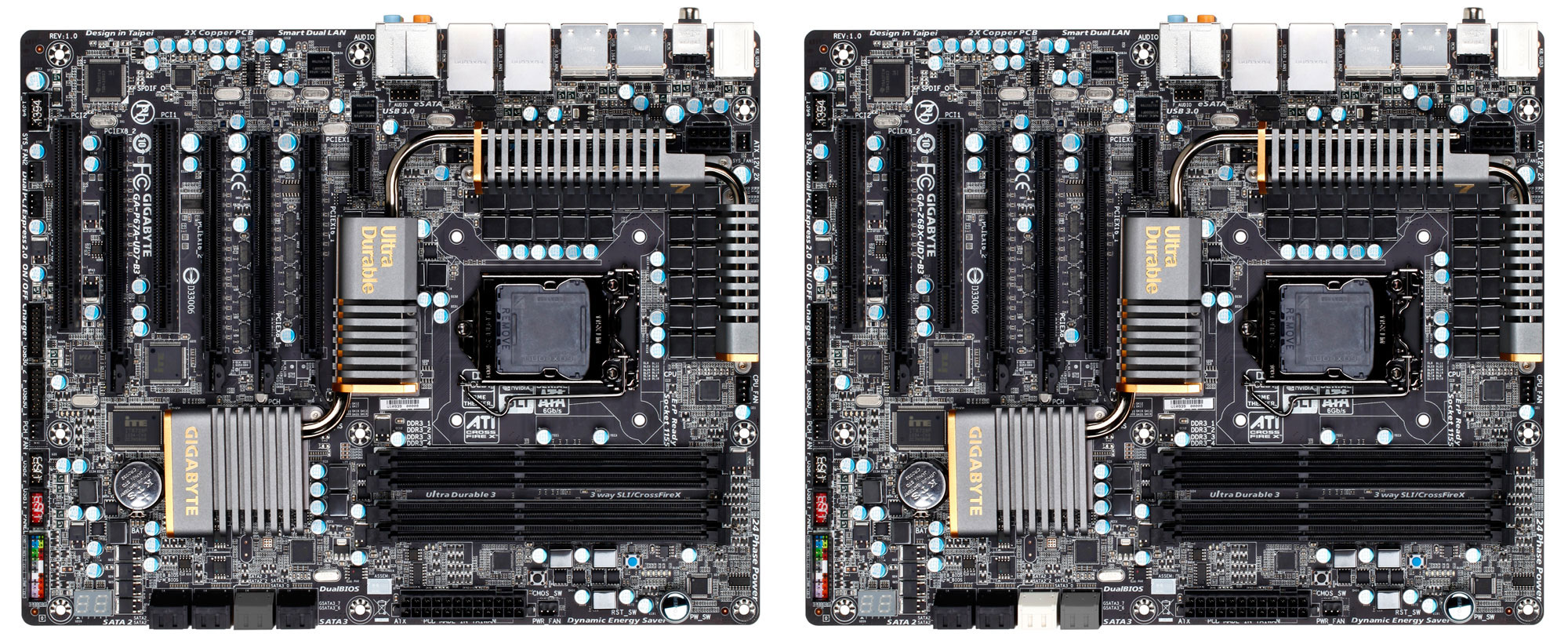
GIGABYTE Z68-UD7-B3 Motherboard Layout

GIGABYTE has been building computer components for going on twenty five years now. Consistently improving, redesigning and bringing new features to the market, GIGABYTE is on the leading edge of the market. Over the past couple of years, I have used several GIGABYTE motherboards in some of my personal systems, and reviewed even more GIGABYTE products. Throughout my personal experience with GIGABYTE products, I have always been happy with the GIGABYTE products. Hopefully when all is said and done, today will be no different!

Today we have the top of the line Intel Z68 express chipset motherboard from GIGABYTE, the GIGABYTE Z68X-UD7-B3! Being the flagship socket 1155 motherboard from GIGABYTE, the Z68X-UD7-B3 isn't priced for faint of heart. It  is priced for those of us that will pay for the quality and want all the features that the GIGABYTE Z68X-UD7-B3 had to offer! Right now you can pick up the GIGABYTE Z68X-UD7-B3 for as little as $337.91 Plus shipping.

There are two main features that were essentially added to the Intel P67 Chipset to make up the new Z68 chipset. The first is Intel Smart Response Technology, a quote about Intel Smart Response Technology from Joe's article:

Using the latest version of Rapid Storage Technology drivers (10.5) and adjusting some easy settings in the Intel Control Center you essentially create a RAID configuration which treats the SSD as a cache for the most frequently used data. Access then comes via the faster SSD rather than the slower HDD, increasing performance markedly. Right now, some are thinking, wait, this isn't new...we've seen a version of this before! The voices in your head are correct. A while back we had a look at the Seagate Momentus XT Hybrid drive which essentially employs the same concept, albeit all bundled on a single drive.

Intel HD Graphics

The second feature that was employed was the ability to use the Intel HD Graphics on the second generation Intel Core iX series processors. While the graphic aren't that spectacular for gaming purposes, they do have a number of capabilities that can be quite handy. One of which is Intel Quick Sync Video, also commonly referred to as Intel QSV. Intel QSV completes the video processing on the hardware instead of on the software.

For some reason, GIGABYTE chose not to implement the second half of the Intel Z68 chipset features on the GIGABYTE Z68X-UD7-B3. Gigabyte hinted that enthusiasts wouldn't be wanting that feature on a high-end board like the Z68X-UD7, but since consumers are paying an extra $55 for this board over the P67A-UD7 we think that choice should be up to them.

GIGABYTE P67A-UD7-B3 24 Phase Power Design

The GIGABYTE Z68X-UD7-B3 has 24 Phases of power being delivered to the CPU help to build a much more reliable power delivery system. The entire GIGABYTE 6 series of motherboards uses DUAL CPU Power Technology. This technology allows the CPU VRM power phases to split into a pair of power engines that work together. In the case of the Z68X-UD7-B3 12 phases will be inactive while the other 12 are supplying power.

GIGABYTE Dual CPU Power Technology

If you are using your shiny new GIGABYTE Z68X-UD7-B3 for some light work like web browsing or any other task that isn't very CPU intensive, the Dual CPU Power Technology will drop the number of phases that are active. Fire up an application like Folding at Home that will really use the CPU power that you have and the GIGABYTE Z68X-UD7-B3 will increase the number of active phases up to the maximum 24 for the ultimate power delivery system.

Intersil PWM controller VRD12

Speaking of power phases, all of the GIGABYTE 6 series motherboards use an Intersil PWM controller. The Intersil PWM controller has been approved by Intel and is VRD 12 compliant. The Intel approved PWM controller offers SerialVID (SVID); this transfers power management information from the processor to the voltage regulator controller. This allows a more efficient signaling control between the CPU and PWM controller. What does this mean for the end user? Ideally, a more energy efficient system.

GIGABYTE P67A-UD7-B3 Driver Mosfets

Traditional power delivery consists of a pair pf discrete PowerMOS and a driver IC. GIGABYTE has incorporated these components into a single chip. Doing this gives us several advantages. One of these advantages is size. The area required to mount the Driver MOSFET's is reduced by 50%. This will leave real estate available on the PCB for other integrated devices. Driver MOSFET's can achieve increased efficiency and higher power transfer at higher switching frequencies. This will help satisfy the growing power needs of the current processors.

One aspect of the Intel Z68 chipset that is an issue for some is the limited number of PCI express lanes. Being limited to a total of 16 lanes some companies have thrown in a third party chip to add some lanes. ASUS used the PLX PEX8608 chip to add a few extra lanes on the ASUS P8P67 Deluxe to bring the total number of PCIe lanes to 24. 20 of which are usable by the PCIe graphics. GIGABYTE went a different route, they added the NVIDIA NF200 chip to give a total of 32 PCIe lanes to the P67A-UD7-B3. This allows the Z68X-UD7-B3 to operate a pair of cards at x16 each or four cards at x8 each.

GIGABYTE Z68X-UD7-B3 Z68 Chipset Motherboard Specifications


CPU  - Support for:
  • Intel Core i7 processors

  • Intel Core i5 processors

  • Intel Core i3 processors

  • Intel Pentium processors

  • Intel Celeron processors in the LGA1155 package

Chipset  - Intel Z68 Express Chipset
Memory
  • 4 x 1.5V DDR3 DIMM sockets supporting up to 32 GB of system memory

  • Dual channel memory architecture

  • Support for DDR3 2133/1866/1600/1333/1066 MHz memory modules

  • Support for non-ECC memory modules

  • Support for Extreme Memory Profile (XMP) memory modules

Audio
  • Realtek ALC889 codec

  • High Definition Audio

  • 2/4/5.1/7.1-channel

  • Support for Dolby Home Theater

  • Support for S/PDIF Out

LAN
  • 2 x Realtek RTL8111E chips (10/100/1000 Mbit)

  • Support for Teaming

  • Support for Smart Dual LAN

Expansion Slots
  • 2 x PCI Express x16 slots, running at x16 (PCIEX16_1, PCIEX16_2)

  • 2 x PCI Express x16 slots, running at x8 (PCIEX8_1, PCIEX8_2)1

  • 1 x PCI Express x1 slot
    (All PCI Express slots conform to PCI Express 2.0 standard.)

  • 2 x PCI slots

Multi-Graphics Technology  - Support for 2-Way/3-Way ATI CrossFireX/NVIDIA SLI technology
Storage Interface  - Chipset:
  • 2 x SATA 6Gb/s connectors (SATA3_0, SATA3_1) supporting up to 2 SATA 6Gb/s devices

  • 4 x SATA 3Gb/s connectors (SATA2_2~SATA2_5) supporting up to 4 SATA 3Gb/s devices 

  • Support for SATA RAID 0, RAID 1, RAID 5, and RAID 10

 - 2 x Marvell 88SE9128 chips:
  • 2 x SATA 6Gb/s connectors (GSATA3_6, GSATA3_7) supporting up to 2 SATA 6Gb/s devices 

  • 2 x eSATA 6Gb/s connectors (eSATA/USB Combo) on the back panel supporting up to 2 SATA 6Gb/s devices

  • Support for SATA RAID 0 and RAID 1

USB  - Chipset:
  • Up to 8 USB 2.0/1.1 ports (4 on the back panel, including 2 eSATA/USB Combo, 4 via the USB brackets connected to the internal USB headers)

 - 2 x Renesas D720200 chips and 2 x VLI VL810 hubs:
  • Up to 10 USB 3.0/2.0 ports (6 on the back panel, 4 via the USB brackets connected to the internal USB headers)

IEEE 1394  - T.I. TSB43AB23 chip:
  • Up to 3 IEEE 1394a ports (2 on the back panel, 1 via the IEEE 1394a bracket connected to the internal IEEE 1394a header)

Internal I/O Connectors
  • 1 x 24-pin ATX main power connector

  • 1 x 8-pin ATX 12V power connector

  • 4 x SATA 6Gb/s connectors

  • 4 x SATA 3Gb/s connectors

  • 1 x CPU fan header

  • 3 x system fan headers

  • 1 x power fan header

  • 1 x Chipset fan header

  • 1 x front panel header

  • 1 x front panel audio header

  • 1 x S/PDIF Out header

  • 2 x USB 2.0/1.1 headers

  • 2 x USB 3.0/2.0 headers

  • 1 x IEEE 1394a header

  • 1 x clearing CMOS button

  • 1 x power button

  • 1 x reset button

Back Panel Connectors
  • 1 x PS/2 keyboard/mouse port

  • 1 x optical S/PDIF Out connector

  • 1 x coaxial S/PDIF Out connector

  • 2 x IEEE 1394a ports

  • 2 x USB 2.0/1.1 ports

  • 6 x USB 3.0/2.0 ports

  • 2 x eSATA/USB Combo connectors

  • 2 x RJ-45 ports

  • 6 x audio jacks (Center/Subwoofer Speaker Out/Rear Speaker Out/Side Speaker Out/Line In/Line Out/Microphone)

I/O Controller  - iTE IT8728 chip
H/W Monitoring
  • System voltage detection

  • CPU/System temperature detection

  • CPU/System/Power fan speed detection

  • CPU overheating warning

  • CPU/System/Power fan fail warning

  • CPU/System fan speed control

BIOS
  • 2 x 32 Mbit flash

  • Use of licensed AWARD BIOS

  • Support for DualBIOS

  • PnP 1.0a, DMI 2.0, SM BIOS 2.4, ACPI 1.0b

Unique Features
  • Support for @BIOS

  • Support for Q-Flash

  • Support for Xpress BIOS Rescue

  • Support for Download Center

  • Support for Xpress Install

  • Support for Xpress Recovery2

  • Support for EasyTune

  • Support for Dynamic Energy Saver 2

  • Support for Smart 6

  • Support for Auto Green

  • Support for eXtreme Hard Drive (X.H.D)

  • Support for ON/OFF Charge

  • Support for Cloud OC

  • Support for Q-Share

Form Factor ATX Form Factor; 30.5cm x 24.4cm

GIGABYTE Z68X-UD7-B3 compared to the P67A-UD7-B3

The GIGABYTE Z68X-UD7-B3 is identical to the GIGABYTE P67A-UD7-B3 that we took a look at a little over a month ago. In the above photo you can see that the boards are virtually identical. The only visual differences I was able to find was the color of the SATA III 6Gbps ports. If you are interested in the bundle, layout, or system BIOS of the GIGABYTE Z68X-UD7-B3 please reference the appropriate pages of our GIGABYTE P67A-UD7-B3 review as they are identical. For now let's jump to the test system page and take a look at what we will be using for our system today!

Next Page - The Legit Reviews Test System


Read more...

Thursday, 14 July 2011

IGP performance world record smashed on overclocked GIGABYTE Llano motherboard

20019_11_gigabyte_a75m_ud2h_with_upcoming_amd_apu_breaks_igp_world_record

TweakTown.com have published an article and video where they have our forthcoming A75M-UD2H motherboard pushing AMD’s latest Llano APU to achieve an incredible P6281 points in 3DMark Vantage (performance mode). TweakTown is claiming this overclock as a world record for an integrated graphics processor, further ramping up the buzz of expectation regarding AMD’s eagerly anticipated Llano APU platform launch later this week. We’ve put a lot of work into making our new Llano-compatible AMD A series boards the ideal base for these new Accelerated Processor Units, or APUs, so of course we’re totally chuffed to see a record-breaking overclock on one of our boards at this early stage.

 “You may have seen this type of configuration before, but not like how you are going to see in the video above. We managed to overclock the AMD CPU from its default clock speed of 2.9GHz all the way up to 3.6GHz (150 x 24) using an FSB of 150MHz. In turn this also overclocked the DX11 Radeon HD GPU within the AMD APU from a core clock speed of 600MHz to 900MHz. This is really impressive and we even saw Crysis 2 running at 720p at around 40 - 45 frames per second and from a system without a video card (strange to look at, actually), that is rather good.” – TweakTown

<\/param><\/embed><\/object><\/div>";" alt="">

Read the full article on TweakTown here.

You can read this blog in Chinese (中文版) here.

Read more...

GIGABYTE A series mobos play Crisis 2 at 40 frames per second…

Our friends from VR-Zone.com managed to get some footage of the new A75M-UD2H motherboard running an overclocked AMD A8-3850 APU running Crysis 2 at 30-40 frames per second.

image

The APU was heavily overclocked and game settings were less than optimal, but nevertheless, Crisis 2 on IGP is unheard of!

Speaking of which, we just released our own little video featuring GIGABYTE’s A75 chipset MBs that debuts Stew, our new in house geek and PC gamer. He’s from Liverpool as I’m sure you’ll pick up if you check out this little production.


Read the Chinese (中文版) version of this blog post here.

Read more...

GIGABYTE extends Z68 MB + Intel mSATA SSD bundle to Taiwan

Digitimes is reporting that the Z68XP-UD3-iSSD bundle (Z68XP-UD3 MB + 20GB Intel SSD 311 Series) will also be available in Taiwan. Origionally, this bundle was only planned for early adopter markets such as the USA, Japan, Germany, Korea, and Australia, so it’s good to see this exclusive offer becoming available in other markets too.

image

The bundle is available from leading online retailers such as Newegg in the USA (US$239.99), and will continue while stocks last. GIGABYTE’s press announcement with all the details and specs is available here.

Chinese version (中文版) here.

Read more...

GIGABYTE officially launch AMD Llano A series Motherboards

A75_ad_0621_chart

Today we’re officially announcing the launch of our new A series motherboard range, supporting the very latest AMD APUs which we think will offer DIY builders a solid mainstream platform with added graphics muscle. We’ve announced seven motherboard models all based on the AMD A75 chipset. The top SKU is the GA-A75-UD4H which is an ATX form factor board with integrated HDMI, DisplayPort, Dual Link DVI and D-Sub video outputs, two PCIe ports (x16 and x8) supporting CrossFireX and a slew of features including 8 USB 3.0 ports, an 8+2 phase power VRM on a 2oz PCB – all in all, it’s one hell of a board.

A75-UD4H-Board-Box

We’re predicting that these new AMD APUs will invigorate the mainstream and entry-level DIY segment, offering some pretty decent graphics and 3D gaming performance as well as solid HD video capabilities. The integrated GPU on these Llano chips is really quite impressive. Here’s a video we made showing the platform playing Crysis 2 – not something you’d usually do without employing a discrete graphics card. As you can also see in the video, we also managed to squeeze a substantial overclock from our AMD A8350 APU, hitting a score of over 6000 points in 3DMark Vantage (performance mode). I’m sure you’ll agree….pretty impressive!

As you may have noticed, all these new A75-based boards will be sold as part of our Super4 motherboard product range. This basically means that you’re getting high-end components from top to bottom; features like 2ox copper PCB, 50,000 hour solid capacitors, dual BIOS chips, On/Off charging, dedicated fusing for each USB port and 108db HD audio. I guess GIGABYTE Super4 is a simple way to describe a range of features that will make sure you’re getting a really solid, durable and reliable motherboard regardless of price point.

Check out the press release here.

GIGABYTE A series motherboard site here.

Chinese version of this blog entry here.

Read more...

Bitfenix USB 3.0 connectors pass GIGABYTE motherboard compatibility testing

Modern motherboards can have up to 2 onboard USB 3.0 headers, but not every mobo ships with front USB 3.0 connector cables. What do you do if your case doesn’t support enough front panel USB 3.0 connectors?

image

I’m facing this problem at the moment with my newest PC build where my new case only has 1 onboard header for USB 3.0 (for 2 front USB 3.0 ports). This means that the other 2 front USB 3.0 ports are wasted! What’s more is that my PC sits snugly under my desk in my cubicle at work, so it is not practical for me to always get on my hands and knees to access the USB 3.0 ports in the back I/O panel, so I want to have the maximum number of convenient front panel USB ports.

Bitfenix just sent us two solutions to this problem in the form of the BFA-U3-KU3IU3-RP Internal USB 3.0 Adapter and the BFA-U3-K435-RP USB 3.0 Front Panel. They both just passed GIGABYTE motherboard compatibility testing and we have added them to our USB 3.0 microsite. Here they are (they are hyperlinked so just click on them to have a look at the Bitfenix product web page):

image  image

I especially like the front panel connector because it has 4 USB 3.0 ports with a decent distance between them so that you can use multiple bulky USB devices at the same time.

Check out our USB 3.0 microsite for more USB 3.0 devices that have passed GIGABYTE motherboard compatibility testing.

A Chinese version of this blog article can be found here.

Read more...

Gigabyte 990FXA-UD7 Motherboard has Hardware Heaven on cloud 9

gigabyte-990fxa-ud7_slots

Our high-end AMD 900 series motherboard offering has certainly impressed Stuart Davidson at HardwareHeaven.com. The 990FXA-UD7 was given a thorough and detailed examination last week, winning an impressive 49 out of 50 points plus the Hardware Heaven Gold award. Here’s a taste of what Stu had to say:

Performance wise the 990FXA-UD7 is again very impressive. It outperforms the fastest board we have seen so far from ASUS and features all of the latest technology such as USB 3.0 and SATA 6GB/s to utilise the potential of our components. Users may also find support for 3TB drives, enhanced USB charging and Bluetooth auto shutdown to be valuable features.

Of course these high specifications and features do come at a cost which makes this board more expensive than most 990FX alternatives. That said, at £189/$249 the 990FXA-UD7 is still considerably cheaper than alternative boards for the Intel X58 platform.

score

Summary
An excellent motherboard which has great performance and some excellent features. Added to that it is the fastest AMD 990FX board we have tested so far.

gold

The 990FXA-UD7 is in fact the most highly specced AMD motherboard that GIGABYTE has ever done, in fact the first in our UD7 class. Let’s not forget too that excitement levels should notch up a level in a month or so’s time when AMD highly anticipated AMD FX Bulldozer CPUs come to market. We can barely contain our excitement.

Full HardwareHeaven review here.

Read this blog in Chinese here.

Read more...
Tech Report examine AMD’s Llano on GIGABYTE A75M-UD2H

socket-fm1

Here’s a great in depth article on the new A-Series APUs from AMD. Writing for TechReport.com, Scott Wasson compares these new APUs, codenamed Llano, to previous AMD platforms as well as Intel’s Sandy Bridge and Gulftown offerings. It’s an interesting read that examines the pros and cons of AMD’s Fusion architecture which places more emphasis on the graphics element than we’ve seen in the past. From a strictly Gigabyte perspective, we were also quite flattered to see that Tech Report based a lot of their testing and benchmarks on GIGABYTE boards.

For example Intel X58 Gulftown tests were performed on our X58A-UD5 board, AMD 800 series tests used the Gigabyte 890GPA-UD3H while for the new AMD A8-3850 Tech Report selected the Gigabyte A75M-UD2H.

ud2h

Check out the full article here.

Chinese version here.

Read more...

GIGABYTE Tech Daily now available in Traditional Chinese

We’re proud to announce that from now on a Chinese language version of this blog will be available to those of you who prefer to keep up with the world of GIGABYTE motherboards and read our ramblings, opinions and general musings in Traditional Chinese.  We might well be a global leader in motherboard and design and innovation, but we’re still very much a Taiwanese company at heart,  so it’s great that we now have a mirror site in the local language.

You can check out the new site at this URL: http://gigabytedailycht.blogspot.com/

ChineseBlogImage

技嘉科技日報中文版全新上線

我們榮幸地宣布,技嘉科技日報中文版即日起正式上線,以便服務所有喜歡閱讀我們的隨筆、關心技嘉主機板動態以及科技趨勢,但又習慣閱讀繁體中文的讀者們。雖然技嘉科技是主機板設計及創新領導廠商,但我們從來沒忘記,我們仍是一間立足台灣的公司。所以能將我們部落格的內容以本土語言忠實呈現,對我們來說是非常值的高興的事,希望您也跟我們一樣興奮,並喜歡我們的新網站。

您可以點選下列網址瀏覽技嘉科技日報中文版:http://gigabytedailycht.blogspot.com/

Read more...

Hi Tech Legion give GIGABYTE 990FXA-UD5 a Gold Rating

GA-990FXA-UD5-

George Cella-Cella on Hi Tech Legion has just finished his review of our AMD Bulldozer-ready GIGABYTE 900 series 990FXA-UD5 motherboard, and by all accounts he is mightily impressed, giving it their highest Hi Tech Legion Gold Award.

“There is no disputing that the Gigabyte GA-990FXA-UD5 is an absolute top of the line motherboard. The GA-990FXA-UD5 is packed with features, all of which work absolutely flawlessly. Build on the GA-990FXA-UD5 is solid, with great finish and attention to detail. The included Easy Tune 6 utility works extremely well as an overclocking utility for the novice, as well as being a very capable hardware monitor and fan speed controller. With the Gigabyte GA-990FXA-UD5, you get an extremely capable and feature rich motherboard, all wrapped in one very attractive sleek black package. The GA-990FXA-UD5 is highly recommended.” – HiTechLegion

gold

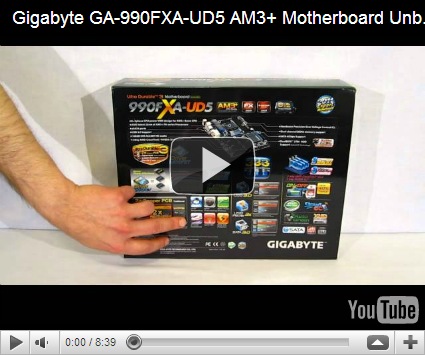
George has also published an unboxing video that covers the packaging and key features of the 990FXA-UD5 board in some detail. Check it out below.

<\/param><\/embed><\/object><\/div>";" alt="">

We’re really happy that George has taken the time to explore and benchmark what is surely one of the most complete and full-featured AMD platform motherboards that Gigabyte has ever done. I’m convinced also that most AMD DIYers will, like ourselves, be even more excited at the prospect of putting this board through its paces packing AMD’s forthcoming FX processors. Here’s hoping they really gives us some Bulldozing performance level to shout about.

Catch the full GA-990FXA-UD5 review on HiTechLegion.

Read this blog in Chinese here. 中文版

Read more...

GIGABYTE G1.Sniper 2 images revealed; Sandy Bridge for extreme gaming

s-G1-Sniper-2-Socket

We’ve just uploaded some new images of the our forthcoming GIGABYTE G1.Sniper 2 motherboard to our Facebook page. This was actually on display during Computex 2011 under the name ‘Z68 Gaming’. The G1.Sniper 2 will feature the latest Intel Z68 chipset supporting the high-performance Sandy Bridge processors.

s-G1-Sniper-2-Angle1 

That’s all we can really say for now. We’ll keep you informed regarding official launch dates etc.

Remember, you can view the complete GIGABYTE G1.Sniper 2 image collection on our Facebook page here.  And don’t be afraid to give us a ‘Like’ if you feel inclined to do so.

Chinese version here. 中文版

Read more...

GIGABYTE X58A-OC Mobo takes X58 Bclk World Record @ 276.42

PC DIY forum legend, Lsdmeasap, has been playing around with his GIGABYTE X58A-OC mobo to see what OC world records are still available for it. Last week he found that he was 3rd overall in the base clock (Bclk) standings, so this weekend he brought on the chill with some dry ice cooling and took first place with a comfortable margin!

The full story can be found on Tweaktown.com.

image

Congratulations Ed, not a small achievement for such a mature platform!

Update: you can read Lsdmeasap’s forum posts at the following links:

http://forums.tweaktown.com/overclocking/45071-gigabyte-x58a-oc-takes-bclk-world-record-276-42-bclk.html

http://www.xtremesystems.org/forums/showthread.php?273091-Gigabyte-X58A-OC-Takes-Bclk-World-Record-276.42-Bclk!!

http://www.overclock.net/intel-motherboards/1062252-gigabyte-x58a-oc-takes-bclk-world.html

You can read this blog in Chinese (中文版) here.

Read more...

PCTuning use GIGABYTE boards for early Bulldozer and Gulftown head to head

sli_2

It would appear that Czech hardware site PCtuning have apparently been lucky enough to get their hands an early AMD FX CPU sample, giving us a glimpse of the performance we can expect from AMD’s forthcoming enthusiast CPU line. In his latest article we see that Mr. Z.Obermaier is comparing his AMD FX chip with Intel’s top tier Core i7 990X part. While it’s certainly interesting to see that the new Bulldozer processors are managing to keep pace with their Gulftown counterparts, it’s also quite flattering for us here at Gigabyte to note that the reviewer is using our motherboards for both platforms.

The AMD FX chip is apparently being benched using our recently launched 990FXA-UD7 motherboard. It’s the most full featured AMD board we’ve ever done and the first to be able to harness both AMD and Nvidia multi-GPU setups. In the above image you’re looking at the UD7 in an SLI configuration. The Intel 990X CPU was put through its paces on our champion overclocking board, the GIGABYTE X58A-OC.

While these benchmarks are pretty far from conclusive, they are at least indicators that we may see the extreme performance space heat up in the next few months as AMD launch its FX line. It’s also fair to say that, as 3D gaming applications, these benchmarks are perhaps no 100% CPU-oriented, so even if these results are true, they probably do not represent the raw grunt of the two processors. It does however, at least indicate that in terms of multi-GPU configurations, DIY builders have more choices than ever.

You can read more on this, here and here.

Click here for the Chinese (中文版) version of this blog.

Read more...

AMD A75 Microsite details GIGABYTE A series motherboards

A75_ad

The more sharp-eyed among you may have noticed our official AMD A75 microsite that we recently added to the GIGABYTE site. This microsite highlights the latest AMD A75 GIGABYTE motherboard series, details specific motherboard SKUs along side detailed specifications and also features information about the excellent onboard DX11 graphics and Dual Graphics capabilities of the all new AMD Llano APUs.

You can also learn about GIGABYTE specific advanced features, including On/Off Charge, port-by-port USB overload protection, DualBIOS 3TB + And don’t forget of course that you can use GIGABYTE’s acclaimed EasyTune 6 technology to tweak your AMD APU, memory and GPU to squeeze every once of performance from these Llano processors. Our resident overclocker managed a remarkable 6000 points in 3DMark Vantage Performance on air using high performance memory DIMMs!

 002

And don’t forget that in 2011, we talking about our GIGABYTE Super4 concept. Super 4 basically means that no matter which A75 motherboard model you select, you’ll still be able to enjoy the best quality features that will ensure you’re guaranteed a solid and stable PC build. GIGABYTE Ultra Durable 3 technology, plus 3X USB power, On / Off Charging, Low RDS (on) MOSFETs and advanced Blu-ray optimized 108dB audio quality are just some of the features that we’ve tied together ensuring Super Safe, Super Speed, Super Savings and Super Sound features are built into all models, including the most affordable ones.

GIGABYTE A series microsite,

This blog can be read in Chinese (中文版) here.

Read more...

APH Networks gets intimate with the GIGABYTE G1.Sniper

0301 It is now pretty much common knowledge that we will be announcing its sequel in the next few weeks, but the fact remains that the original X58 based GIGABYTE G1.Sniper board is still very much hot property to any hardcore core gamer who has invested in a high-end Intel i7 Gulftown processor. It is for this reason that reviewer Preston Yuen at APH Networks has spent a good deal of time getting to know our G1.Sniper motherboard on a very intimate level. Here’s an example of what Preston had to say. Regarding the packaging and design:

Here is a box that I thought was quite unique and different from most motherboard packaging I have seen so far. Of course, consistent with its name, Gigabyte incorporated a military grade enclosure in the background as part of the design, with some battlefield scars and other graphics around the box. Emphasizing on this military theme, our motherboard's name is printed boldly in an army font across the center. It is then placed under Gigabyte's G1-Killer Gaming Motherboard series branding, and stamped with a very distinct skull logo at the bottom right corner.

G1.Sniper’s key features:

Taking a close look around the LGA 1366 socket area, we are able to identify the usual array of components related to the CPU voltage regulator circuit, including a decent array of chokes and a couple of gun rail inspired heatsinks on the L-shaped heatpipe.One thing to note here is that the G1.Sniper is one of the rare boards that feature a dedicated LAN processing chip. Not only does it have a BigFoot Killer E2100 NPU, Gigabyte also installed Creative's high end CA20K2-2AG HF X-Fi APU/DSP as part of the motherboard -- with real X-RAM, too. We will cover that in detail in just a moment.

0303

In conclusion:

What I am trying to say is, if you already own a high end computer, and all you are missing is a motherboard, you have nothing to fear -- because what the G1.Sniper is a truly amazing product worthy of its name. As a new motherboard that supports the (slightly) older Intel X58 chipset, the G1.Sniper is not only an unquestionable high end unit -- it also has some amazing dedicated Creative X-Fi based audio hardware under the hood. In fact, it is so good, it will probably save you at least $150 on a dedicated sound card, along with some additional space on your motherboard. If top of the line audio still doesn't convince you, it also has a dedicated BigFoot NPU, which let's just say, it is not a necessity, but definitely a "sure, why not" kind of thing. In addition to the well designed and clean layout, the Gigabyte G1.Sniper also looks incredible in any windowed chassis.

Preston has really gone in to some quite incredible depth (12 long pages!) in his review, so make you take time to read the full version here.

Read more...

GIGABYTE Enables TouchBIOS on H61/P61 Platform


MAIN+4641_big (1)

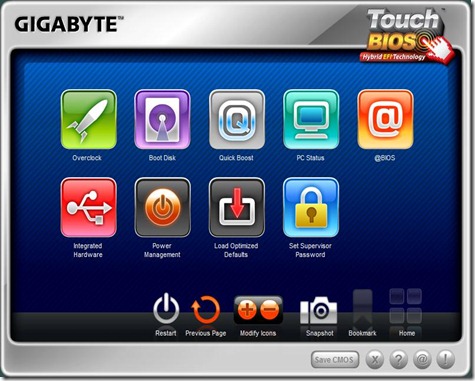
Great news for H61/P61 users wanting to use TouchBIOS on their systems. In addition to the Z68 series, GIGABYTE has just updated several H61/P61 boards with the latest BIOS that will now enable support for our new icon-based BIOS. All you have to do is update to the latest BIOS listed and install the TouchBIOS application, both of which you can do by visiting the GIGABYTE website. Stay tuned in the next coming week or two, as GIGABYTE will also enable TouchBIOS on our AMD A75 and 900 series motherboards.

GIGABYTE H61/P61 Motherboards now Supporting TouchBIOS

Model

Version

BIOS

H61M-USB3-B3

1.1

F8D

H61M-D2-B3

1.1

F7C

H61M-S2V-B3

1.1

F5E

H61M-S2P-B3 (coming soon)

1.1

F2B

H61M-S2-B3

1.0

F2F

P61-USB3-B3

1.1

F8B

P61-DS3-B3

1.1

F3A

P61-S3-B3

1.0

F4A

What is TouchBIOS you ask? Take a look at the video below to find out.

<\/param><\/embed><\/object><\/div>";" alt="">

Read more...

Saturday, 9 July 2011

Gigabyte GeForce GTX 560 OC Edition Video Card Review

Legit Video Card Reviews

Welcome to the Gigabyte GeForce GTX 560 OC Edition Video Card

Today we are going to be looking at an add-in-board partners version of the NVIDIA GeForce GTX 560 video card that might be worth your hard earned money. The card we are looking at today is made by Gigabyte and has the GPU core clock and shaders factory overclocked, so you get an extra performance boost without having to get your hands dirty with overclocking utilities and software. The Gigabyte GeForce GTX 560 OC comes clocked at 830 MHz core, 1660 MHz shaders and 4008 MHz on the GDDR5 memory ICs. The NVIDIA reference design for the GeForce GTX 560 video card is 810 MHz core, 1620 MHz shaders and 4008 MHz memory. As you can see, Gigabyte left the memory clocks alone, but increased the core clock by 20MHz and the shader clock by 40MHz. This is a mild overclock when you step back and look at it, but Gigabyte isn't charging any extra for this overclock as it is their entry level NVIDIA GeForce GTX 560 card design! In fact, this video card is the least expensive of the 14 GeForce GTX 560 video cards that are being sold right now on Newegg.com! So, how much is the card? The GIGABYTE GeForce GTX 560 OC GV-N56GOC-1GI video card is $169.99 after a $20 mail-in rebate!

Gigabyte GeForce GTX 560 OC Video Card Retail Packaging

Now we all know that Gigabyte is one of the leading motherboard manufacturers in the world, but did you know they were in the business of making video cards as well? Well... they are. But I guess the better question would be, do they make a good video card? That is what this article is for. Gigabyte was founded way back in 1986 in Taipei, Taiwan and back then they supplied motherboards to custom computer makers. But now, all these years later, all you have to do is pull the side panel off of a case and chances are you will see one of Gigabyte's products, whether it be a motherboard, video card, or even mice and keyboards.

Gigabyte GeForce GTX 560 OC Video Card

The Gigabyte GeForce GTX 560 OC Video Card features NVIDIA PhysX technology as well as NVIDIA 3D Vision Surround, 3D Vision and Pure Video HD, all of which make your movie watching, or better yet your gaming experience, a far more beautiful and immersive experience. Now, let's not forget SLI, because when you put two Gigabyte GeForce GTX 560 OC Video Cards together you get the ability to nearly double your video gaming pleasure. In these times of tight budgets most people's first question is, "How Much?" Well, the Gigabyte GeForce GTX 560 OC (GV-N56GOC-1GI) Video Card will set you back $169.99 shipped. This also carries a 3 year warranty.

Gigabyte GeForce GTX 560 OC Video Card

But the big star here today is the Windforce cooler on the Gigabyte GeForce GTX 560 OC (GV-N56GOC-1GI) Video Card. With two 100mm fans inclined toward each other it creates a kind of anti-turbulence that not only moves more air away and keeps your new video card nice and cool with 30.5 CFM of airflow from each fan, but it is also very quiet coming in at a mere 31 db at full speed, and full speed is 2000 RPM. Not too bad, if you ask me. You may very surprised by what we found when we tried to fry this card with a full load. I don't want to stop there, though, because there is much more to the Windforce cooler than its inclined fans and quiet operation. It also features four 6mm copper direct contact heat pipes to help dissipate that hot air that surrounds your Gigabyte GeForce GTX 560 OC (GV-N56GOC-1GI) Video Card while it is trying to help you pwn n00b's. And if you are worried that the Gigabyte GeForce GTX 560 OC (GV-N56GOC-1GI) Video Card won't fit into your case, worry not as it weighs in at a little over 9 inches long and a little over 5 inches high, and it is a double slot width video card so the Gigabyte GeForce GTX 560 OC Video Card will have very little problem fitting into most modern cases sold on the market today.

Gigabyte GeForce GTX 560 OC Video Card

Gigabyte currently makes 4 versions of the GTX 560 Series GPU:

  • Gigabyte GeForce GTX 560 OC(GV-N56GOC-1GI)
  • 830 MHz Core Clock/4008 MHz memory Clock at $169.99
  • Gigabyte GeForce GTX 560 Ti SO (GV-N560SO-1GI-950)
  • 950 MHz Core Clock/4580 MHz memory clock at $259.99
  • Gigabyte GeForce GTX 560 Ti SO (GV-N560SO-1GI)
  • 1000 MHz Core Clock/4580 MHz memory Clock at $259.99

  • Gigabyte GeForce GTX 560 Ti OC (GV-N560OC-1GI)
  • 900 MHz Core Clock/4000 MHz memory Clock at $296.65

Looks like Gigabyte has made sure there is a card for everyone's taste as well as their budget. As you can see, all of the video cards listed above are from the Ti series. At the time of this writing Gigabyte does not make any other non Ti card than the one we are looking at today. This is the part of the article where I tell all of you that we should take a look at the features and specifications of the Gigabyte GeForce GTX 560 OC Video Card, and that we should quit wasting time and find out just how the Gigabyte GeForce GTX 560 OC (GV-N56GOC-1GI) Video Card performed in our battery of torture tests.

Gigabyte GeForce GTX 560 OC Video Card Specs:

  • Core Clock: 830 MHz

  • Memory Clock: 4008 MHz

  • Shader Clock: 1660 MHz

  • CUDA Cores: 336

  • Bus Type: PCI-E 2.0

  • Memory: 1 GB GDDR5

  • Memory Bit Width: 256 Bit

  • Memory Bandwidth: 131.3GB/sec

  • Texture Fill Rate: 47.6 GT/s

Gigabyte GeForce GTX 560 OC Video Card Features:

  • Microsoft Direct X 11 Support

  • Nvidia CUDA Technology

  • Nvidia PhysX Technology

  • Nvidia Pure Video HD Technology

  • Nvidia 2 Way SLI Ready

  • Nvidia 3D Vision Surround Ready

  • Two dual-Link HDCP Capable Connectors

  • One Mini-HDMI 1.4 Connector

  • OpenGL 4.1 Support

Next Page - Gigabyte GeForce GTX 560 OC Edition Video Card Packaging


Read more...

  © Blogger templates The Professional Template by Ourblogtemplates.com 2008

Back to TOP